cancel
Showing results for 
Search instead for 
Did you mean: 

Try your skills in the Power BI Dataviz World Championship! Round one ends June 26. Join now

Reply
robertra
Regular Visitor

OneDrive Refresh is not working properly


I saw many topics in regards to the refresh part and everything seems to be solved but for some reason, I cannot make it work.
I have linked a dataset from OneDrive Business (Spreadhseet file).
I have turned on every refresh option I could find. 
I have opened the Focus Mode for all and left them on my screen. Nothing changed in 2h since I did all the above, although the data has been updated in the source file (on OneDrive - Business).


1.JPG2.JPG


That hour is 2 hours ago and I cannot figure out how to make these datasets and reports to actually do the update.

6 REPLIES 6
jimmyleongth
New Member

I will like to know the functionality of the OneDrive Refresh as it states:


By default, OneDrive updates files hourly.


Based on my observations since I have activated the OneDrive Refresh for the past 16 hours ( April 17), when I have turned this on, there is no indication in:


1) The refresh history

2) Last Refresh Column.


Look forward to your reply.


Cheers,

Jimmy


v-qiuyu-msft
Community Support
Community Support

Hi @robertra,


Based on my understanding, you import the Excel file which stored in OneDrive for Business to Power BI Service, and generate a corresponding dataset, you create a report use this dataset. Then you enable OneDrive Refresh for the dataset, leave the report page opened, after the dataset is refreshed, the report still not update, right?


Whenever we run the report, the data display in the report is based on the dataset data at that time. It means that once the dataset is refreshed, if we keep the report in previous status, the report will not retrieve data from updated dataset automatically. So we need to manually refresh report to send a request to dataset to get updated data.


If you have any question, please feel free to ask.


Best Regards,
Qiuyun Yu


Community Support Team _ Qiuyun Yu
If this post helps, then please consider Accept it as the solution to help the other members find it more quickly.


Hello @v-qiuyu-msft

Yes, you are correct. I understand your explanation.
I see PowerBI losing some functionality because of this:
- let's say I have a giant screen on which I want to present real time data; just open the report, leave it open, so that the audience can see real time how the graphs and charts change based on the dataset being updated.

- currently you cannot do that (as per your explanation);

- furthermore, an autorefresher still does not do the job because it will resize the report to a preview mode (take it out of the Focus Mode);


It would help a lot if one of the 2 issues would be fixed(either a direct hyperlink to a report Focus Mode view or to be able and set the report to autorefresh by itself).

Hi @robertra,


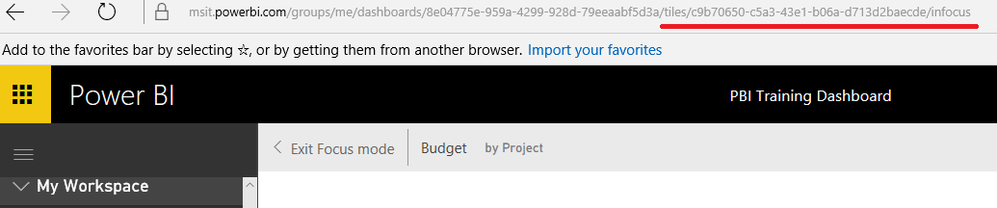
As far as I know, the report is not supported to set auto refresh like the dataset, you can vote on this similar idea item: Schedule refresh to update reports. In addition, we cann't get a focus mode about a visua in the report, but we can pin the visual to dashboard and get URL in focus mode like below. Then you can try to set the browser auto refresh this page, see: http://www.guidingtech.com/12491/auto-refresh-pages-chrome-firefox-opera/


q4.PNG


Best Regards,
Qiuyun Yu

Community Support Team _ Qiuyun Yu
If this post helps, then please consider Accept it as the solution to help the other members find it more quickly.

I will try this today.

Anonymous
Not applicable

@robertra I forget where I saw this, but depending on what you are trying to accomplish - this free app "Dashboard Rotator" might do the trick.

Helpful resources

Announcements
Fabric Data Days is here Carousel

Data Days 2026

Don't miss out on Data Days, June 15 through August 7. Learn Fabric, Power BI, SQL, AI and more.

May Power BI Update Carousel

Power BI Monthly Update - May 2026

Check out the May 2026 Power BI update to learn about new features.

Power BI DataViz World Championships carousel

Power BI DataViz World Championships - June 2026

A new Power BI DataViz World Championship is coming this June! Don't miss out on submitting your entry.