cancel
Showing results for 
Search instead for 
Did you mean: 

Level up your Power BI skills this month - build one visual each week and tell better stories with data! Get started

Reply
V3GAS
Helper I
Helper I

OData Feed: Data Source Connection Error

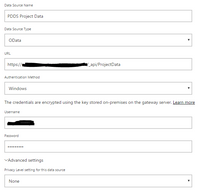
We are having an issue with Data Source connections using an Enterprise Data Gateway on a local server connecting to a Project Server 2013 API. Just a brief FYI - this data source was already connected to /_api/ProjectData and we already have three reports/datasets configured and published, but is now no longer working. 

DataSource6.PNG

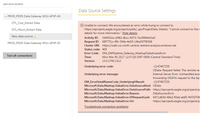
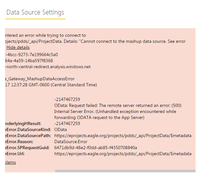
Our Data Gateway is connected with additional data source connections working properly. We have tried to delete/add the data source back to the gateway, but we are receiving the following error:

DataSource1.PNGDataSource2.PNGDataSource3.PNG


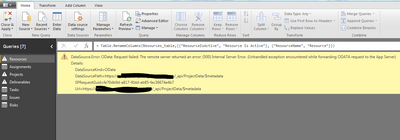
When opening the prior reports, we are getting this error in the Query Editor:

DataSource4.PNG

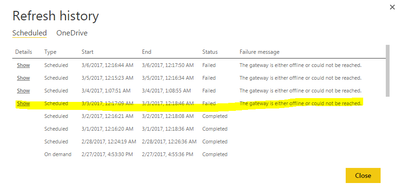
Because of the Data Source connection error, the Data Gateway does not show online in the datasets:

DataSource5.PNG


Please help... 

1 ACCEPTED SOLUTION
V3GAS
Helper I
Helper I

Update: After looking into this issue further and speaking with my team, we found that it was our Global Policy removing the credentials to the NT Service\PBIEgwService account that Power BI uses to connect to the Data Gateway. Once we added the account into the Global Policy, the issue corrected itself.


Thank you for taking the time to reply to my concern.


View solution in original post

4 REPLIES 4
V3GAS
Helper I
Helper I

Update: After looking into this issue further and speaking with my team, we found that it was our Global Policy removing the credentials to the NT Service\PBIEgwService account that Power BI uses to connect to the Data Gateway. Once we added the account into the Global Policy, the issue corrected itself.


Thank you for taking the time to reply to my concern.


v-haibl-msft
Microsoft Employee
Microsoft Employee

@V3GAS


You need to provide the .saz file which you can save with Fiddler.


Best Regards,

Herbert

Vicky_Song
Impactful Individual

 
v-haibl-msft
Microsoft Employee
Microsoft Employee

@V3GAS


Could you please repro the problem in Mar 2017 version of PBI Desktop with Fiddler running, clicking "Refresh" in the Query Editor to get the data source error. Then provide the fiddler trace to me?


Best Regards,

Herbert

Helpful resources

Announcements
April Power BI Update Carousel

Power BI Monthly Update - April 2026

Check out the April 2026 Power BI update to learn about new features.

Fabric SQL PBI Data Days

Data Days 2026 coming soon!

Sign up to receive a private message when registration opens and key events begin.

New to Fabric survey Carousel

New to Fabric Survey

If you have recently started exploring Fabric, we'd love to hear how it's going. Your feedback can help with product improvements.

Power BI DataViz World Championships carousel

Power BI DataViz World Championships - June 2026

A new Power BI DataViz World Championship is coming this June! Don't miss out on submitting your entry.