This time we’re going bigger than ever. Fabric, Power BI, SQL, AI and more. We're covering it all. You won't want to miss it.
Learn moreLevel up your Power BI skills this month - build one visual each week and tell better stories with data! Get started
Hello everyone.
As a workaround for this issue (https://community.fabric.microsoft.com/t5/Desktop/Use-SQL-server-connection-not-working/m-p/3850674#...), I connected to my database using an ODBC connection. My question is:
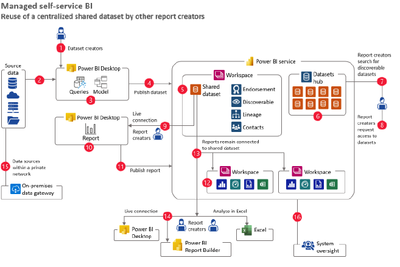
- Is this a recommended way to connect in case I need to deploy the report and create a structure like this? (See image below)
I'm asking this because it's the first time connecting using ODBC, so I want to ensure best practices from the beginning.
Thanks
Solved! Go to Solution.
@julsr See my reply to your previous message as that might help solve this. ODBC would not be recommended as you would need to recreate the ODBC connection on your gateway and it will be slower.
Check out the April 2026 Power BI update to learn about new features.
Sign up to receive a private message when registration opens and key events begin.
If you have recently started exploring Fabric, we'd love to hear how it's going. Your feedback can help with product improvements.
| User | Count |
|---|---|
| 11 | |
| 9 | |
| 9 | |
| 7 | |
| 6 |
| User | Count |
|---|---|
| 47 | |
| 27 | |
| 24 | |
| 24 | |
| 22 |