Share feedback directly with Fabric product managers, participate in targeted research studies and influence the Fabric roadmap.
Sign up nowGet Fabric certified for FREE! Don't miss your chance! Learn more
Hello!
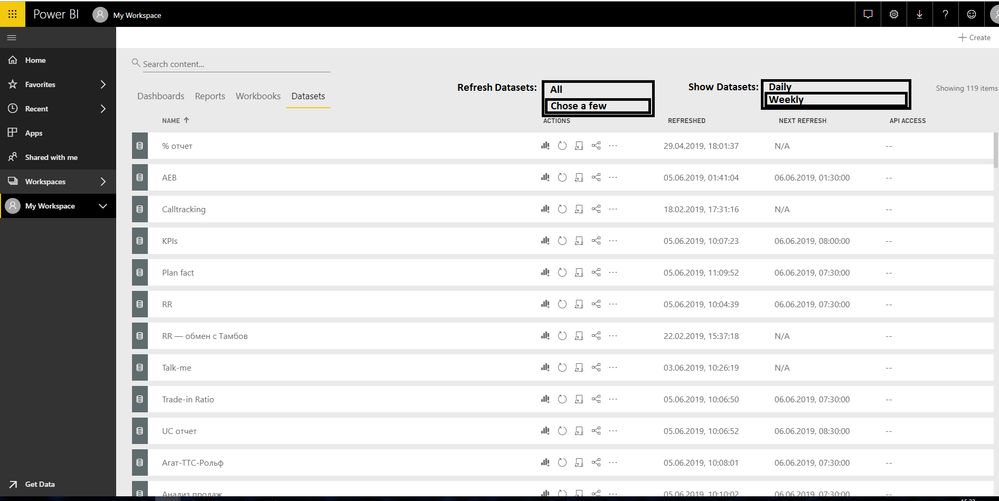
Is it possible to make the button or tools that can refresh the whole Dataset at once?
And also make it possible to refresh Datasets filtering it by the Refresh frequency.
May be something like that:
I mean, it is very laborious process to refresh clicking to every Dataset.
It is needed when something went wrong with Gateway Connection and 10 or more Datasets used this Gateway.
It would be very usefull if we can see only daily Datasets.
Solved! Go to Solution.
I'm afraid currently there's no such kind of feature in power bi service. As a workaround, you can configure schedule refresh for each dataset. Please refer to: https://docs.microsoft.com/en-us/power-bi/refresh-scheduled-refresh
Community Support Team _ Jimmy Tao
If this post helps, then please consider Accept it as the solution to help the other members find it more quickly.
I'm afraid currently there's no such kind of feature in power bi service. As a workaround, you can configure schedule refresh for each dataset. Please refer to: https://docs.microsoft.com/en-us/power-bi/refresh-scheduled-refresh
Community Support Team _ Jimmy Tao
If this post helps, then please consider Accept it as the solution to help the other members find it more quickly.
It was'nt a solution! Have the same problem. I know about schedule. It is not what I wanted
@v-yuta-msft wrote:
I'm afraid currently there's no such kind of feature in power bi service. As a workaround, you can configure schedule refresh for each dataset. Please refer to: https://docs.microsoft.com/en-us/power-bi/refresh-scheduled-refresh
Community Support Team _ Jimmy Tao
If this post helps, then please consider Accept it as the solution to help the other members find it more quickly.
If you love stickers, then you will definitely want to check out our Community Sticker Challenge!
Check out the January 2026 Power BI update to learn about new features.
| User | Count |
|---|---|
| 18 | |
| 7 | |
| 7 | |
| 7 | |
| 7 |
| User | Count |
|---|---|
| 50 | |
| 44 | |
| 27 | |
| 25 | |
| 25 |