Join us at FabCon Atlanta from March 16 - 20, 2026, for the ultimate Fabric, Power BI, AI and SQL community-led event. Save $200 with code FABCOMM.
Register now!The Power BI Data Visualization World Championships is back! Get ahead of the game and start preparing now! Learn more
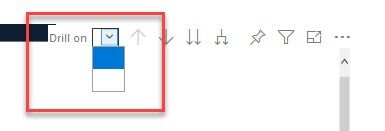
For a couple of weeks now the drill on option on the matrix shows blank. The options are there just the text does not show
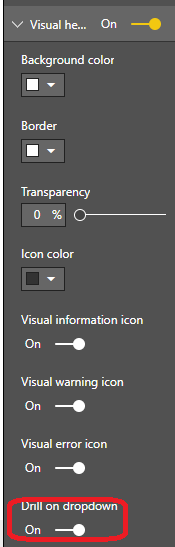
Click format pane-> visual header-> turn off the option "Drill on dropdown"
Community Support Team _ Jimmy Tao
If this post helps, then please consider Accept it as the solution to help the other members find it more quickly.
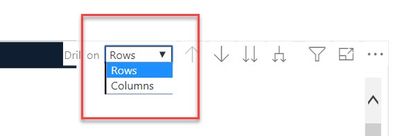
@v-yuta-msft Thanks for the response, but I don't want to turn it off, I want it to show but I want the options (Rows - Columns) to show in the dropdown. As you can see in my original post, the options don't show they show as blank (but do actually work). Just to clarify in the desktop you see this
In the Service, i see (in all browsers)
The Power BI Data Visualization World Championships is back! Get ahead of the game and start preparing now!
| User | Count |
|---|---|
| 56 | |
| 55 | |
| 31 | |
| 17 | |
| 14 |