cancel
Showing results for 
Search instead for 
Did you mean: 

The Power BI Data Visualization World Championships is back! Get ahead of the game and start preparing now! Learn more

Reply
Anonymous
Not applicable

Map Highlight bubbles

Hi !

I am trying to see some information in the Map visual tool. Im relating to tables because I have the info in 2 different tables, One for the Installbase and one for the Headcounts. At the same time I have 2 slicers, One that select the information from Installbase(IB) and is called "Channel" has 2 selection in the slicer: Direct/Indirect. The second slicer contains information from the headcount(HC) like the region. You can see in the IMG better:

Untitled.png

The issue is that when I tried to select something from the Channel slicer, the blue bubbles dissapear because this slicer is like filtering the information that I have just selected. What I want is tha instead of only seeing the info that I selected, I want to add or see in different colors what we are selecting. I want to see all the info despite what im selecting.

Thanks!

1 ACCEPTED SOLUTION
Anonymous
Not applicable

Hi @Anonymous 

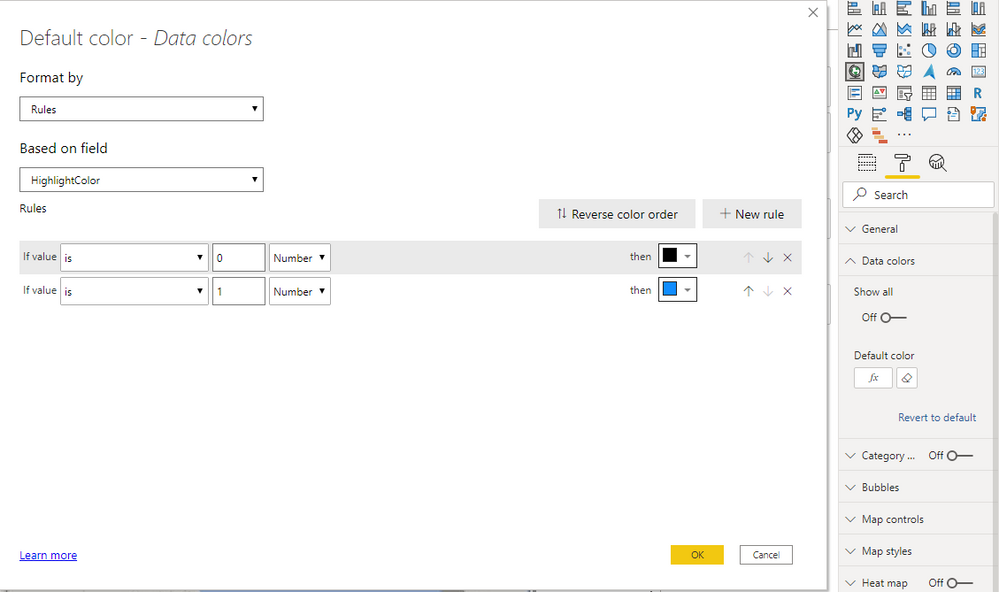
You can hightlight your bubbles by adding measure into data color.

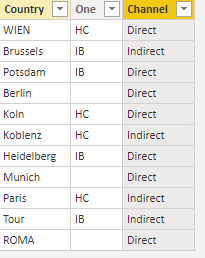
I build a sample table:
1.png

Build two slicer tables without building relationships between them and this table.

Channel = VALUES('Table'[Channel])
Role = VALUES('Table'[One])

Measure:

HighlightColor = 
VAR _SelChannel =
    SELECTEDVALUE ( Channel[Channel] )
VAR _SelRole =
    SELECTEDVALUE ( Role[One] )
RETURN
    IF (
        ISFILTERED ( Channel[Channel] ) && ISFILTERED ( Role[One] )
            && _SelRole = MAX ( 'Table'[One] )
            && _SelChannel = MAX ( 'Table'[Channel] ),
        1,
        IF (
            ISFILTERED ( Channel[Channel] )
                && _SelChannel = MAX ( 'Table'[Channel] )
                && _SelRole = BLANK (),
            1,
            IF (
                ISFILTERED ( Role[One] )
                    && _SelRole = MAX ( 'Table'[One] )
                    && _SelChannel = BLANK (),
                1,
                0
            )
        )
    )

 Add this measure into the  data color .
2.png

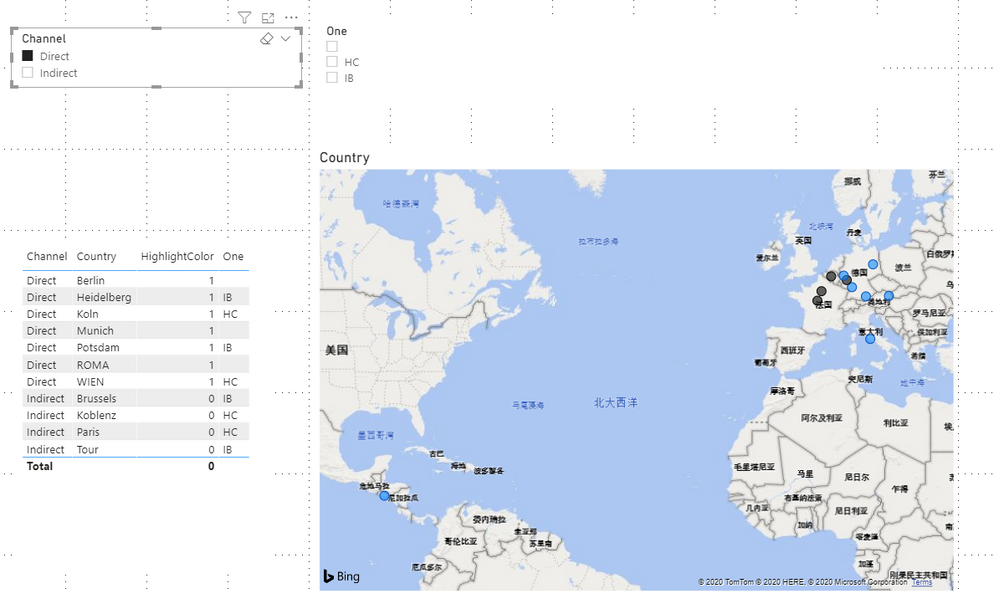
Result is as below, bubbles in map will show black by default and will be highlighted in blue when you select slicer.
3.png

You can download the pbix file from this link: Map Highlight bubbles


Best Regards,

Rico Zhou


If this post helps, then please consider Accept it as the solution to help the other members find it more quickly. 

View solution in original post

3 REPLIES 3
Anonymous
Not applicable

Hi @Anonymous 

Could you tell me if your problem has been solved? If it is, kindly Accept it as the solution. More people will benefit from it. Or you are still confused about it, please provide me with more details about your table and your problem or share me with your pbix file from your Onedrive for Business.


Best Regards,

Rico Zhou

Anonymous
Not applicable

Hi @Anonymous 

You can hightlight your bubbles by adding measure into data color.

I build a sample table:

1.png

Build two slicer tables without building relationships between them and this table.

Channel = VALUES('Table'[Channel])
Role = VALUES('Table'[One])

Measure:

HighlightColor = 
VAR _SelChannel =
    SELECTEDVALUE ( Channel[Channel] )
VAR _SelRole =
    SELECTEDVALUE ( Role[One] )
RETURN
    IF (
        ISFILTERED ( Channel[Channel] ) && ISFILTERED ( Role[One] )
            && _SelRole = MAX ( 'Table'[One] )
            && _SelChannel = MAX ( 'Table'[Channel] ),
        1,
        IF (
            ISFILTERED ( Channel[Channel] )
                && _SelChannel = MAX ( 'Table'[Channel] )
                && _SelRole = BLANK (),
            1,
            IF (
                ISFILTERED ( Role[One] )
                    && _SelRole = MAX ( 'Table'[One] )
                    && _SelChannel = BLANK (),
                1,
                0
            )
        )
    )

 Add this measure into the  data color .

2.png

Result is as below, bubbles in map will show black by default and will be highlighted in blue when you select slicer.

3.png

You can download the pbix file from this link: Map Highlight bubbles


Best Regards,

Rico Zhou


If this post helps, then please consider Accept it as the solution to help the other members find it more quickly. 
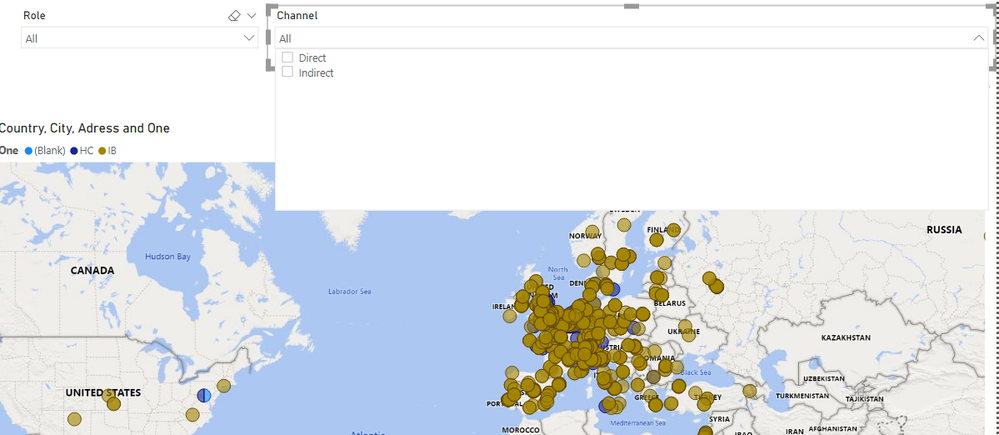
I cant download you powerbi file ! 

beside that didnt work when i selelct the year per exemple it shown me only the filtred bubbles on the map ! 


Helpful resources

Announcements
Power BI DataViz World Championships

Power BI Dataviz World Championships

The Power BI Data Visualization World Championships is back! Get ahead of the game and start preparing now!

December 2025 Power BI Update Carousel

Power BI Monthly Update - December 2025

Check out the December 2025 Power BI Holiday Recap!

FabCon Atlanta 2026 carousel

FabCon Atlanta 2026

Join us at FabCon Atlanta, March 16-20, for the ultimate Fabric, Power BI, AI and SQL community-led event. Save $200 with code FABCOMM.