Get certified for free when you join Fabric Data Days 2026 and dive into Fabric, Power BI, SQL, AI, and other essential data skills.
Join nowData Days is here! Join us now for 60+ days of learning, challenges, and connection. Learn more
Hi,
So I have created a Microsoft form with likert questions. I want the answers to be displayed on power BI with the counts of how many chose 'beginner', 'intermediate','advanced' and 'expert' in graphs or charts for the many different questions. How do I do this?
thanks
Hi @kk2018,
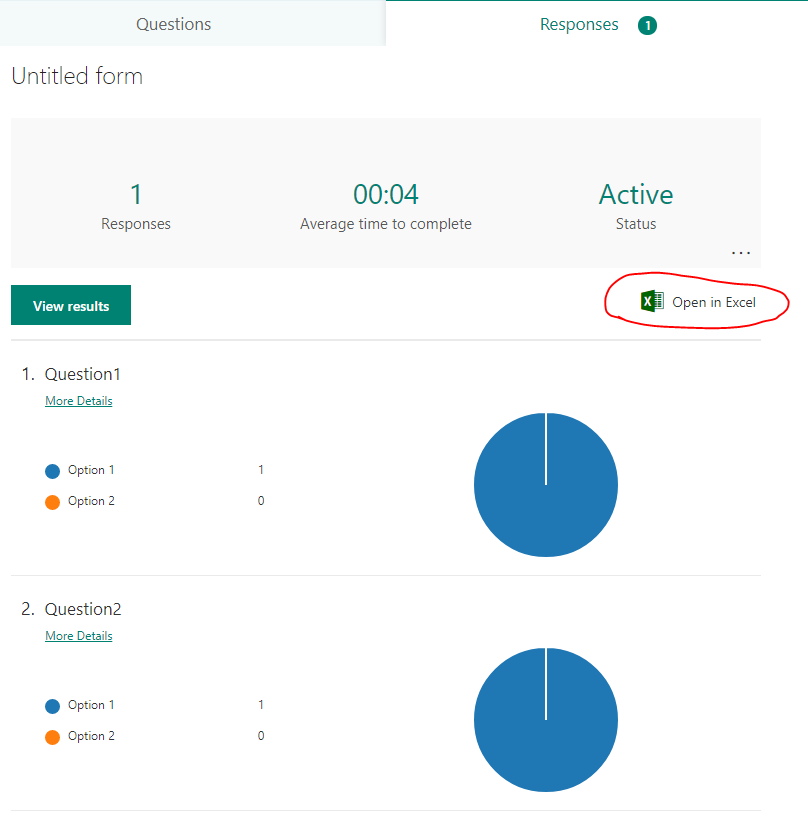
You can export the user response data stored in Microsoft From to Excel file. Then, connect to this Excel file in desktop.
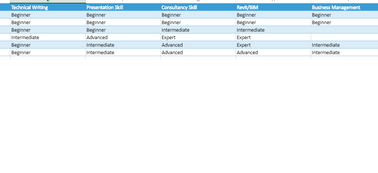
For more advice, please post sample data of the exported excel file and show us the desired output.
Best regards,
Yuliana Gu
Thank you for your response.
I want to be able to make graphs showing how many of each skill (technical writing, presentation skill etc) chose which skill level (beginner, intermediate etc) in graphs and charts on power bi. I want to do this on the online app of power bi because I want the form to be regularly updated. How can I use power BI to count how many of each skill level there is?
Don't miss out on Data Days, June 15 through August 7. Learn Fabric, Power BI, SQL, AI and more.
Check out the May 2026 Power BI update to learn about new features.
| User | Count |
|---|---|
| 16 | |
| 11 | |
| 10 | |
| 8 | |
| 7 |
| User | Count |
|---|---|
| 41 | |
| 36 | |
| 36 | |
| 28 | |
| 20 |