Join us at FabCon Atlanta from March 16 - 20, 2026, for the ultimate Fabric, Power BI, AI and SQL community-led event. Save $200 with code FABCOMM.
Register now!Get Fabric Certified for FREE during Fabric Data Days. Don't miss your chance! Request now
Hello Team,
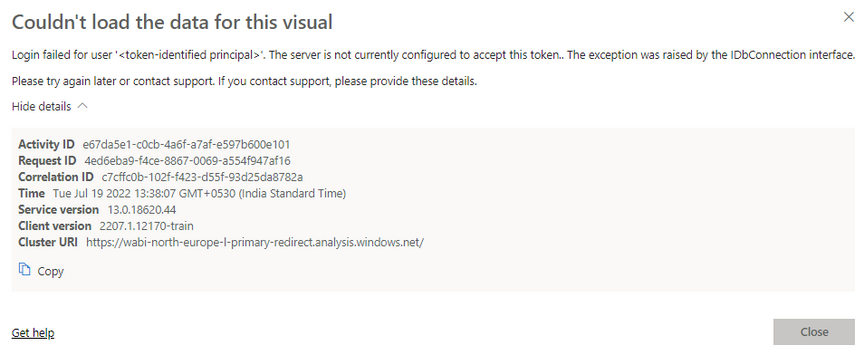
I am currently facing "Login failed for user 'token-identified principal'. The server is not currently configured to accept this token.. The exception was raised by the IDbConnection interface.
I have followed several solutions posted on the forum. Those solutions not works to me.
Ex: https://community.powerbi.com/t5/Desktop/Direct-Query-Cannot-Load-Model-Login-Failed-for-user-The/m-...
and another solution to use SSO login. I should not use SSO login for some reasons.
I must use Azure SQL database credentials.
Kindly provide any tip to get the problem fixed.
Thanks,
Solved! Go to Solution.
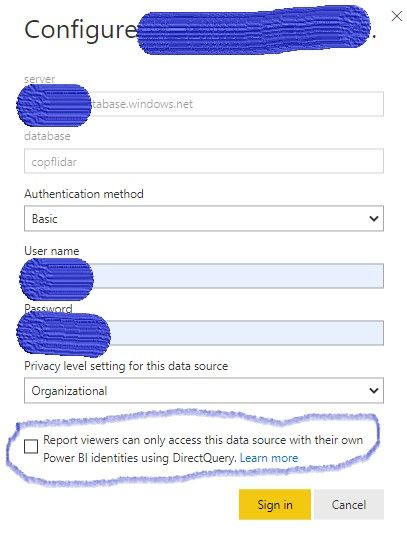
I also got a similar kind of error. I have deselected a check box (Report viewers can only access this data source with their own Power BI identities using Direct query ) in Schedule refresh--> Data source credentials
The error has been fixed.
I think it may help for your requirement.
Please accept as solution and kudos
Thanks
I also got a similar kind of error. I have deselected a check box (Report viewers can only access this data source with their own Power BI identities using Direct query ) in Schedule refresh--> Data source credentials
The error has been fixed.
I think it may help for your requirement.
Thanks, The solution worked for me.
Check out the November 2025 Power BI update to learn about new features.
Advance your Data & AI career with 50 days of live learning, contests, hands-on challenges, study groups & certifications and more!