
cancel
Showing results for 
Search instead for 
Did you mean: 

The Power BI Data Visualization World Championships is back! Get ahead of the game and start preparing now! Learn more

Reply
erpeff
Frequent Visitor

KeyBlocker error while Pushing Data to Power BI using PowerShell

When I am trying to push SQL query data into Power BI using Rest API with PowerShell, getting error says, 


erpeff_3-1657534555366.png


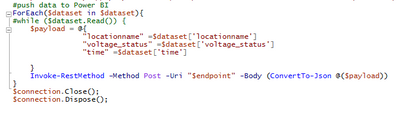
//Code Snippet

erpeff_2-1657534524788.png

Please help me to get out of this...

1 ACCEPTED SOLUTION
v-luwang-msft
Community Support
Community Support

Hi @erpeff ,

Try turning off the firewall and make sure to run it with TLS 1.2 in the script:

[Net.ServicePointManager]::SecurityProtocol = [Net.SecurityProtocolType]::Tls12


Best Regards
Lucien

View solution in original post

3 REPLIES 3
v-luwang-msft
Community Support
Community Support

Hi @erpeff ,

Has your problem been solved, if so, please consider Accept a correct reply as the solution or share your own solution to help others find it.

Best Regards
Lucien

v-luwang-msft
Community Support
Community Support

Hi @erpeff ,

Try turning off the firewall and make sure to run it with TLS 1.2 in the script:

[Net.ServicePointManager]::SecurityProtocol = [Net.SecurityProtocolType]::Tls12


Best Regards
Lucien

Hello,


Where in the code should this be placed?


Thank you,

Brittany 

Helpful resources

Announcements
Power BI DataViz World Championships

Power BI Dataviz World Championships

The Power BI Data Visualization World Championships is back! Get ahead of the game and start preparing now!

December 2025 Power BI Update Carousel

Power BI Monthly Update - December 2025

Check out the December 2025 Power BI Holiday Recap!

FabCon Atlanta 2026 carousel

FabCon Atlanta 2026

Join us at FabCon Atlanta, March 16-20, for the ultimate Fabric, Power BI, AI and SQL community-led event. Save $200 with code FABCOMM.