cancel
Showing results for 
Search instead for 
Did you mean: 

The Power BI Data Visualization World Championships is back! Get ahead of the game and start preparing now! Learn more

Reply
Sujith12345
Helper I
Helper I

Incremental refresh failed while doing refresh

Hi,


My datasource is Excel, I want to do Inc refresh in existing power bi file and I set parameters RangeStart, RangeEnd and after that while applying incremental refresh getting the error " Unable to confirm if the M query can be folded".. And then while doing manual refresh it has been done without any error.

But while doing scheduled refresh, it was not happened.. it shows the error " Fields that need to be fixed: " 


I changed the date column datatype 'Date' to 'Date/ time'.. 

Please help me to find out the right way to fix this issue.. 

4 REPLIES 4
StefanoGrimaldi
Resident Rockstar
Resident Rockstar

hey, 

incremental refresh its designed for sources that support folding, meaning excel isnt one of them, but there are work around to make this type of sources able to run incremental refresh (but are custom escenario, you will need to do some extra steps on them for this to work):

https://www.thepoweruser.com/2020/01/19/incremental-refresh-for-files-in-a-folder-or-sharepoint-powe... 

https://docs.microsoft.com/en-us/power-bi/connect-data/incremental-refresh-overview 

I suggest you to check some example and read some documentation for setting incremental refresh on sorues that doesnt support folding


example: folded sources: SQL, sap, etc etc, non folded sources: excel, cvs, sharepoint etc 


if this helped give some kudos, and if solved the problem mark as solution for others to find it


Did I answer your question? Mark my post as a solution! / Did it help? Give some Kudos!

Proud to be a Super User!


I worked in that already, but still facing the same error " Fields that need to be fixed: " 

Hi @Sujith12345 ,


Some tables name in Service may be inconsistent with the ones in Desktop.

Please try to delete the dataset and report in Power BI Service, and then republish the report from Power BI Desktop to Service.


Best Regards,
Winniz

If this post helps, then please consider Accept it as the solution to help the other members find it more quickly.

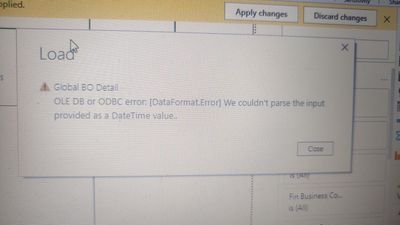
IMG_20211011_142608.jpg

 after passing the parameters in date column, I got this error

Helpful resources

Announcements
Power BI DataViz World Championships

Power BI Dataviz World Championships

The Power BI Data Visualization World Championships is back! Get ahead of the game and start preparing now!

December 2025 Power BI Update Carousel

Power BI Monthly Update - December 2025

Check out the December 2025 Power BI Holiday Recap!

FabCon Atlanta 2026 carousel

FabCon Atlanta 2026

Join us at FabCon Atlanta, March 16-20, for the ultimate Fabric, Power BI, AI and SQL community-led event. Save $200 with code FABCOMM.