cancel
Showing results for 
Search instead for 
Did you mean: 

The Power BI Data Visualization World Championships is back! Get ahead of the game and start preparing now! Learn more

Reply
JoergSch
Frequent Visitor

Incremental Refresh

Hello!


I am currently working to create a report which a huge amount of data and using the Incremental Refresh functionality to get the data.

With that, I have few question and hopefully get an answer here.


1) When I develop the report, I set the RangeStart and RangeEnd. E.g. when I set todays date for the RangeEnd, but then publish the report in 2 weeks, does it automatically use the "current date" as RangeEnd or do I have always to update the RangeEnd before I publish it?


2) What happens when I delete a data in the backend? Do I need to do a full refresh?


Many thanks for your help.


Joerg

1 ACCEPTED SOLUTION
v-xiaotang
Community Support
Community Support

Hi @JoergSch 

Thanks for reaching out to us.

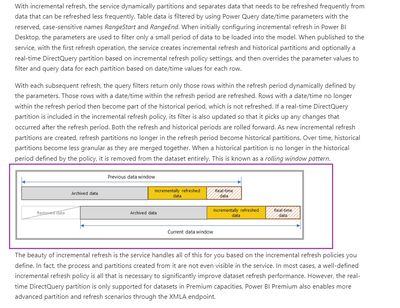
you don't need to update the RangeEnd before you publish it.  RangeStart and RangeEnd, defined in the Manage Parameters dialog in Power Query Editor are initially used to filter the data loaded into the Power BI Desktop model table to include only those rows with a date/time within that period. After the model is published to the service, RangeStart and RangeEnd are overridden automatically by the service to query data defined by the refresh period specified in the incremental refresh policy settings.

For more, please read this article https://docs.microsoft.com/en-us/power-bi/connect-data/incremental-refresh-overview

And its 

vxiaotang_0-1651556953637.png


Best Regards,

Community Support Team _Tang

If this post helps, please consider Accept it as the solution to help the other members find it more quickly.

View solution in original post

1 REPLY 1
v-xiaotang
Community Support
Community Support

Hi @JoergSch 

Thanks for reaching out to us.

you don't need to update the RangeEnd before you publish it.  RangeStart and RangeEnd, defined in the Manage Parameters dialog in Power Query Editor are initially used to filter the data loaded into the Power BI Desktop model table to include only those rows with a date/time within that period. After the model is published to the service, RangeStart and RangeEnd are overridden automatically by the service to query data defined by the refresh period specified in the incremental refresh policy settings.

For more, please read this article https://docs.microsoft.com/en-us/power-bi/connect-data/incremental-refresh-overview

And its 

vxiaotang_0-1651556953637.png


Best Regards,

Community Support Team _Tang

If this post helps, please consider Accept it as the solution to help the other members find it more quickly.

Helpful resources

Announcements
Power BI DataViz World Championships

Power BI Dataviz World Championships

The Power BI Data Visualization World Championships is back! Get ahead of the game and start preparing now!

December 2025 Power BI Update Carousel

Power BI Monthly Update - December 2025

Check out the December 2025 Power BI Holiday Recap!

FabCon Atlanta 2026 carousel

FabCon Atlanta 2026

Join us at FabCon Atlanta, March 16-20, for the ultimate Fabric, Power BI, AI and SQL community-led event. Save $200 with code FABCOMM.