Hi All,
I have below measures in my report :
Total = distinctcount([account_no], [DQ_Issue]= "Record-Set" )
In-Valid_Contacts = calculate(distinctcount([account_no]), DQ_Issue="In-Valid" && Category = "Email-Marketing" )
Valid-Contacts = [Total]-[In-Valid_Contacts]
Valid-Contacts%=[Valid-Contacts]/[Total] *100
My expected output is as below which I am able to get:

But, when I add two additonal fields, that is DQ_Issue and Category , the output is changing.
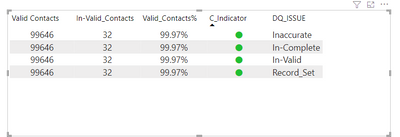
1. Output after I add DQ_Issue field: -> This is still correct as I can add a filter to restrict to only DQ_Issue="In-Valid" and the output is same as expected output
2. Output when I add both DQ_Issue and Category: This is incorrect as after adding a filter to restrict DQ_Issue="In-Valid" and Category="Email-Marketing' the output is changing
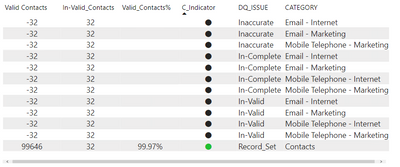
Note: I am adding DQ_Issue and Category field to enable drillthrough to another page based on DQ_Issue and Category. I am basically adding the fields and hiding this from the final output.
Could someone please suggest on how the below output can be achieved.
| Valid Contacts | In-Valid Contacts | Valid Contacts% | DQ_Issue | Category |
| 99646 | 32 | 99.97% | In-Valid | Email-Marketing |


