Join us at FabCon Atlanta from March 16 - 20, 2026, for the ultimate Fabric, Power BI, AI and SQL community-led event. Save $200 with code FABCOMM.
Register now!View all the Fabric Data Days sessions on demand. View schedule
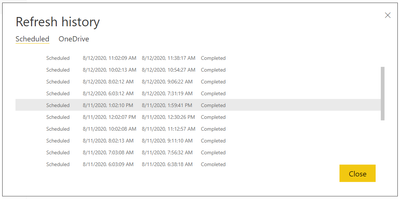
Hello! I've got a Power BI dataset set up on scheduled refreshes (8 refreshes per day, which is what the Pro license allows). For some reason, these refreshes will take vastly different amounts of time - 28 minutes, 91 minutes, 57 minutes, etc. I can't identify a pattern by day or time either (e.g. the 6:00am refresh takes 35 minutes one day, and 90 minutes the next day).
I'd like to know how I can diagnose why this is occurring?
Additional Details: The report is refreshing from an Azure SQL database connection. This database has no interactive users, and maintains a very consistent load throughout the day as it ingests a very consistent amount of IoT data from Stream Analytics. The only time the load spikes is when the Power BI refresh occurs. No users are manually refreshing the report during the scheduled refreshes.
Thanks for your reply! Some of the refreshes are overlapping, unfortunately. Most of the refreshes are scheduled one hour apart from each other, and sometimes they run over one hour. We could scale up the Azure SQL instance, but without knowing the underlying cause of the issue, I feel like that's just throwing money at the problem.
Refreshes cannot overlap. If a refresh is scheduled while another one is in progress then the scheduled refresh request will be dropped.
If you are not on a Premium SKU then you are sharing capacity with other customers. Their behavior impacts your performance in non-predictable ways.
Check out the November 2025 Power BI update to learn about new features.
Advance your Data & AI career with 50 days of live learning, contests, hands-on challenges, study groups & certifications and more!