cancel
Showing results for 
Search instead for 
Did you mean: 

The Power BI Data Visualization World Championships is back! Get ahead of the game and start preparing now! Learn more

Reply
Anonymous
Not applicable

In a DataFlow are partitioned Azure DataLake Gen2 Parquet files supported

I generated partitioned Azure DataLake Gen2 Parquet files using a spark notebook and can query them with no issues in Synapse Analytics using serverless SQL.
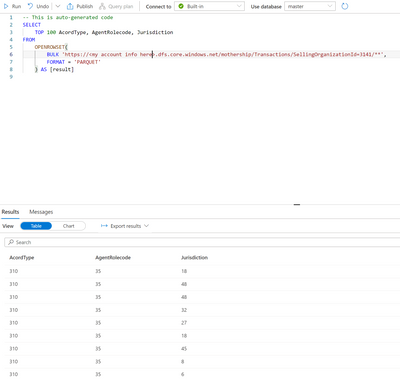
 

bmukes_4-1651771859400.png


When I attempt to create a DataFlow using Azure DataLake Gen 2 storage using Url https://<my account>.dfs.core.windows.net/mothership/Transactions/SellingOrganizationId=3141

I see the 4 expected files.

 

bmukes_2-1651771664959.png

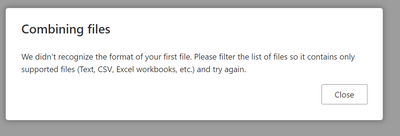
However, when I press Combine I get

bmukes_3-1651771770688.png


Am I doing something wrong or is this not supported.

Here is the POC spark notebook that generates the parquet file


using Microsoft.Spark.Sql;
using Microsoft.Spark.Sql.Types;

var df = spark.Read().Json("abfss://bdmtest@<myaccount>.dfs.core.windows.net/FLT/Trans/2011/04/30/**");

//get the schema of the data frame
var dfSchema = df.Schema() ;

foreach(var parentSchemaField in dfSchema.Fields) {
    
    if (parentSchemaField.DataType is StructType) {
        var childFrame = df.Select($"{parentSchemaField.Name}.*") ;
        foreach(var childSchemaField in childFrame.Schema().Fields) {           
            df = df.WithColumn($"{parentSchemaField.Name}.{childSchemaField.Name}",Col($"{parentSchemaField.Name}.{childSchemaField.Name}")) ;
        }
        df = df.Drop(parentSchemaField.Name) ;
    }
}


//create the computed year, month, and day columns for partitioning
df.CreateOrReplaceTempView("tmpTable") ;
var dfparquet = spark.Sql("SELECT *, SUBSTRING(CreateDate,1,4) AS Year, SUBSTRING(CreateDate,6,2) AS Month, SUBSTRING(CreateDate,9,2) AS Day FROM tmpTable") ;

dfparquet.Write().PartitionBy("SellingOrganizationId","Year","Month","Day").Mode(SaveMode.Overwrite).Parquet("abfss://mothership@<myaccount>.dfs.core.windows.net/Transactions") ;


  This works just fine you you use Power BI Desktop to load the data but you can only use the top most partition. in this case SellingOrganizationId=value  

1 ACCEPTED SOLUTION
Anonymous
Not applicable

I am going to reply to my own question and hopefully it will close this issue and help someone else.


  • What I needed was a Proof of Concept (POC) of putting data into a ADLS Gen2 storage account container where that container is partitioned by DataType/Year=2022/Month=01/Day=01.
  • Then I wanted to create a DataFlow referencing that container to see if Power BI Desktop could use the entities in that DataFlow. 


Anyway the issue was that I could not get it to work in a dataflow and even if I did I doubt that Query Folding would work.

So the alternative was to use serverless sql in Azure Synapse.

  • I could create multiple databases with each database targeting a container within ADLS Gen2.
  • Rather than use AAD passthru I setup access to the CETAS table using a SAS token.
  • Then I used TSQL to create a specific username/password for access to each database.
  • Then I gave that username specific permissions.

This all worked fine until I discovered that you cannot refresh CETAS tables.


But it you do everything else the same and rather than create a CETAS table you create a view using OpenRowset then

"Bobs You Uncle".

Appending additional data to the underlying ADLS Gen 2 container as Year=xxxx/Month=xx/Day=xx works as expected.  I can see the refreshed data if I am attached using SSMS or if I  query in Azure Synapse.  I still have to refresh the DataFlow and for now until I can test using a Computed Engine I have to also refresh the DataSet but it does work in a DataFlow as expected.


Now I need to test using Lake Database tables to determine if they see appended data automatically.

View solution in original post

1 REPLY 1
Anonymous
Not applicable

I am going to reply to my own question and hopefully it will close this issue and help someone else.


  • What I needed was a Proof of Concept (POC) of putting data into a ADLS Gen2 storage account container where that container is partitioned by DataType/Year=2022/Month=01/Day=01.
  • Then I wanted to create a DataFlow referencing that container to see if Power BI Desktop could use the entities in that DataFlow. 


Anyway the issue was that I could not get it to work in a dataflow and even if I did I doubt that Query Folding would work.

So the alternative was to use serverless sql in Azure Synapse.

  • I could create multiple databases with each database targeting a container within ADLS Gen2.
  • Rather than use AAD passthru I setup access to the CETAS table using a SAS token.
  • Then I used TSQL to create a specific username/password for access to each database.
  • Then I gave that username specific permissions.

This all worked fine until I discovered that you cannot refresh CETAS tables.


But it you do everything else the same and rather than create a CETAS table you create a view using OpenRowset then

"Bobs You Uncle".

Appending additional data to the underlying ADLS Gen 2 container as Year=xxxx/Month=xx/Day=xx works as expected.  I can see the refreshed data if I am attached using SSMS or if I  query in Azure Synapse.  I still have to refresh the DataFlow and for now until I can test using a Computed Engine I have to also refresh the DataSet but it does work in a DataFlow as expected.


Now I need to test using Lake Database tables to determine if they see appended data automatically.

Helpful resources

Announcements
Power BI DataViz World Championships

Power BI Dataviz World Championships

The Power BI Data Visualization World Championships is back! Get ahead of the game and start preparing now!

November Power BI Update Carousel

Power BI Monthly Update - November 2025

Check out the November 2025 Power BI update to learn about new features.

FabCon Atlanta 2026 carousel

FabCon Atlanta 2026

Join us at FabCon Atlanta, March 16-20, for the ultimate Fabric, Power BI, AI and SQL community-led event. Save $200 with code FABCOMM.