Get Fabric or SQL Certified for Free.
Get certified for free when you join Fabric Data Days 2026 and dive into Fabric, Power BI, SQL, AI, and other essential data skills.
Join now- Power BI forums
- Get Help with Power BI
- Desktop
- Service
- Report Server
- Power Query
- Mobile Apps
- Developer
- DAX Commands and Tips
- Custom Visuals Development Discussion
- Health and Life Sciences
- Power BI Spanish forums
- Translated Spanish Desktop
- Training and Consulting
- Instructor Led Training
- Dashboard in a Day for Women, by Women
- Galleries
- Data Stories Gallery
- Themes Gallery
- Contests Gallery
- QuickViz Gallery
- Quick Measures Gallery
- Visual Calculations Gallery
- Fabric Apps Gallery
- Notebook Gallery
- Translytical Task Flow Gallery
- TMDL Gallery
- R Script Showcase
- Webinars and Video Gallery
- Ideas
- Custom Visuals Ideas (read-only)
- Issues
- Issues
- Events
- Upcoming Events
July 28 - August 9 | Final Round of the Power BI Dataviz World Championships. This is your chance. Learn more
- Power BI forums
- Forums
- Get Help with Power BI
- Service
- Re: Import data with multiple levels
- Subscribe to RSS Feed
- Mark Topic as New
- Mark Topic as Read
- Float this Topic for Current User
- Bookmark
- Subscribe
- Printer Friendly Page


- Mark as New
- Bookmark
- Subscribe
- Mute
- Subscribe to RSS Feed
- Permalink
- Report Inappropriate Content
Import data with multiple levels
In the tutorial video, the microsoft guy was able to import data with different levels (e.g., he was able to break down geography into cities and countries, and break down products into different types of products).
If I have a column, e.g., products, in my excel file, how should I prepare the data so that when I import into Power Bi Service, it can be broken down into different types of products (such as cameras, wheels, tablet)?

- Mark as New
- Bookmark
- Subscribe
- Mute
- Subscribe to RSS Feed
- Permalink
- Report Inappropriate Content
Hi @sengyap,
>>In the tutorial video, the microsoft guy was able to import data with different levels (e.g., he was able to break down geography into cities and countries, and break down products into different types of products).
Since I'm not very clear your requirement, can you share us some detail information about this?
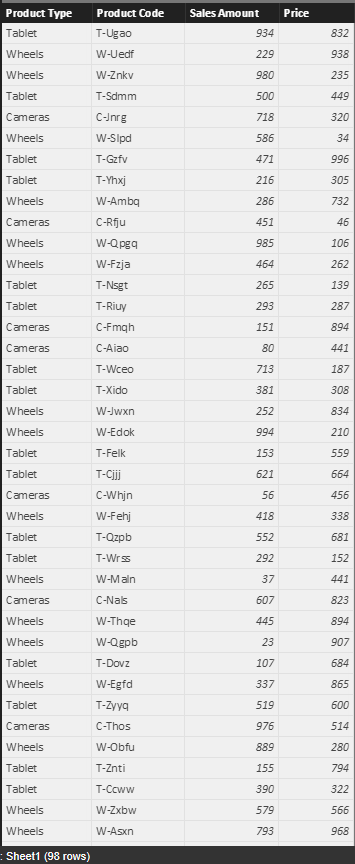
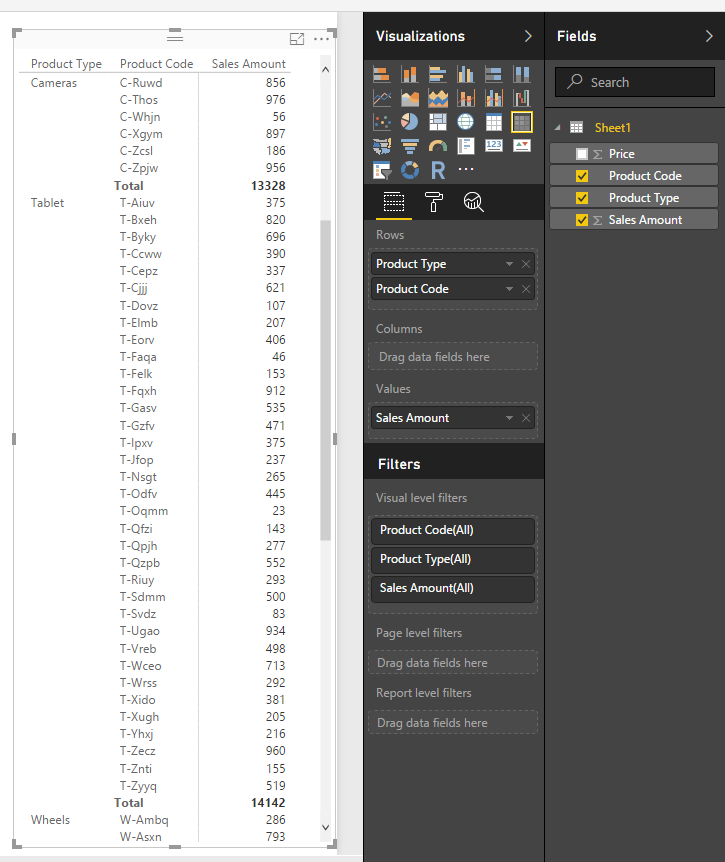
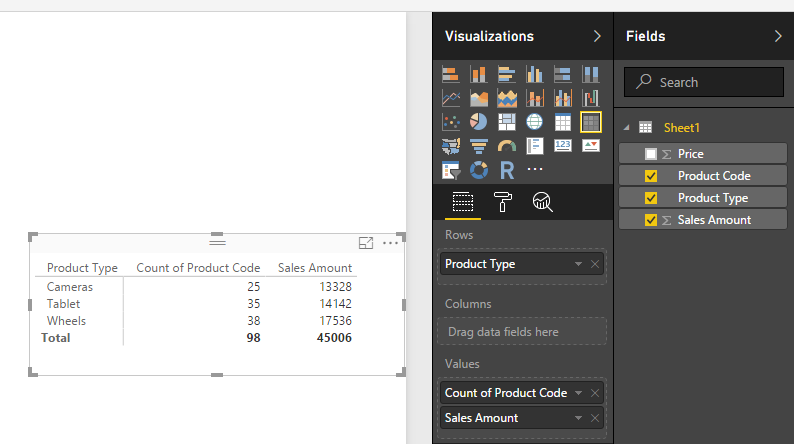
In addition, if you want to group by product type, you can follow below steps to prepare data.
Table:
Create visuals.
Matrix:
Regards,
Xiaoxin Sheng
- Mark as New
- Bookmark
- Subscribe
- Mute
- Subscribe to RSS Feed
- Permalink
- Report Inappropriate Content
Sure. I am referring to this video tutorial https://powerbi.microsoft.com/en-us/guided-learning/powerbi-learning-3-2-create-customize-simple-vis....
I am not sure how he was able to break down the "geography" category into so many city, country, district, and the "sales" categoy into revenue, units, YTD revenue.
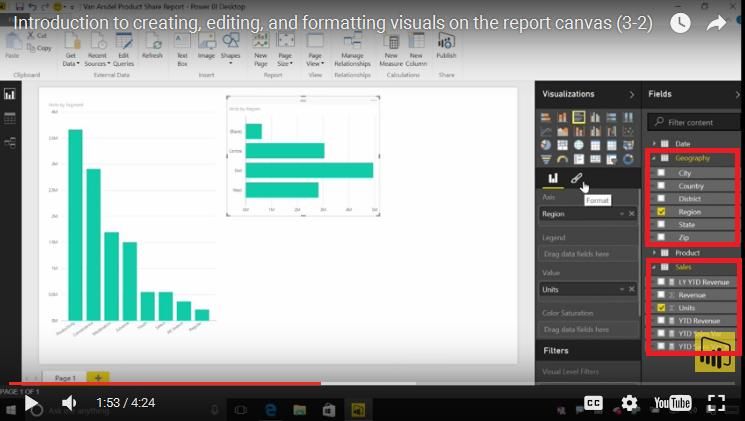
When I import my data, my "country" data cannot be broken down into the respective countries, such as Indonesia, Cambodia.

Also, how was he able to connect to so many datasets in a single report?
- Mark as New
- Bookmark
- Subscribe
- Mute
- Subscribe to RSS Feed
- Permalink
- Report Inappropriate Content
Hi @sengyap,
>>When I import my data, my "country" data cannot be broken down into the respective countries, such as Indonesia, Cambodia.
Did you make sure the country field's data category is correctly identified to city or state or province?
If not, you should manual modify it.

In addition, you should drag your "geography" column to legend file to group the data.
>>Also, how was he able to connect to so many datasets in a single report?
You can use get data button to add multiple datasource which from different place.
Regards,
Xiaoxin Sheng
- Mark as New
- Bookmark
- Subscribe
- Mute
- Subscribe to RSS Feed
- Permalink
- Report Inappropriate Content
Dear Xiaoxin_Sheng,
Thank you for replying.
I am using Power Bi service, not Power Bi desktop. Does it allow me to modify my country field's data category to city or state or province?
After I import the data sources using "get data", how do I use the data sources for my report? I am only able to use one data source per report.
Regards,
Seng Yap
- Mark as New
- Bookmark
- Subscribe
- Mute
- Subscribe to RSS Feed
- Permalink
- Report Inappropriate Content
Hi @sengyap,
>>After I import the data sources using "get data", how do I use the data sources for my report? I am only able to use one data source per report.
Based on research and test, It is impossible to use multiple datasource on service, perhaps you can edit on desktop and publish to service.
Regards,
Xiaoxin Sheng
- Mark as New
- Bookmark
- Subscribe
- Mute
- Subscribe to RSS Feed
- Permalink
- Report Inappropriate Content
Can I modify my country field's data category to city or state or province using service?
- Mark as New
- Bookmark
- Subscribe
- Mute
- Subscribe to RSS Feed
- Permalink
- Report Inappropriate Content
Hi @sengyap,
I think this property only support desktop.(I can't find it at service side)
Regards,
Xiaoxin Sheng
- Mark as New
- Bookmark
- Subscribe
- Mute
- Subscribe to RSS Feed
- Permalink
- Report Inappropriate Content
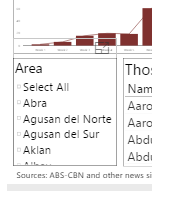
Do you happen to know how to do this?
- Mark as New
- Bookmark
- Subscribe
- Mute
- Subscribe to RSS Feed
- Permalink
- Report Inappropriate Content
Hi @sengyap,
>>Do you happen to know how to do this?
Did you mean the select all function? If as I said, you can turn on it at Format tab -> Selection Controls.
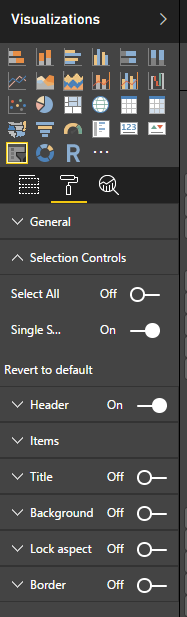
Regards,
Xiaoxin Sheng
- Mark as New
- Bookmark
- Subscribe
- Mute
- Subscribe to RSS Feed
- Permalink
- Report Inappropriate Content
Sorry for the late reply.
I do not see the select all function on powerbi service.
I only see slicer, but it does not allow me to select more than one element and it only allows one field.
- Mark as New
- Bookmark
- Subscribe
- Mute
- Subscribe to RSS Feed
- Permalink
- Report Inappropriate Content
Hi @sengyap,
You can modify these options at edit report.
Turn off the "single select" option and turn on "select all" option:
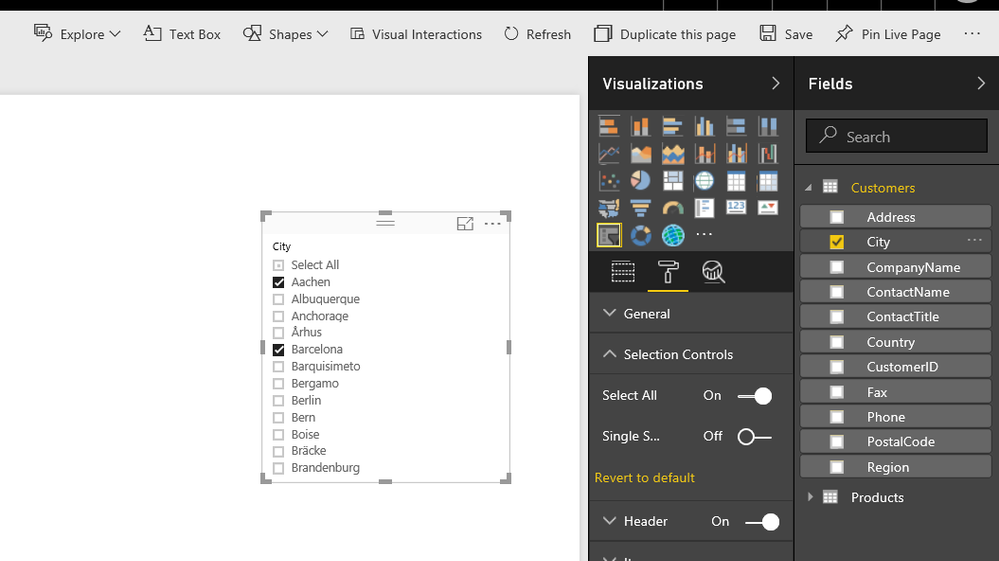
Regards,
Xiaoxin Sheng
- Mark as New
- Bookmark
- Subscribe
- Mute
- Subscribe to RSS Feed
- Permalink
- Report Inappropriate Content
Yes it works. Thank you.
May I also ask you two more other questions?
How do I minimise the empty space in my embedded map?
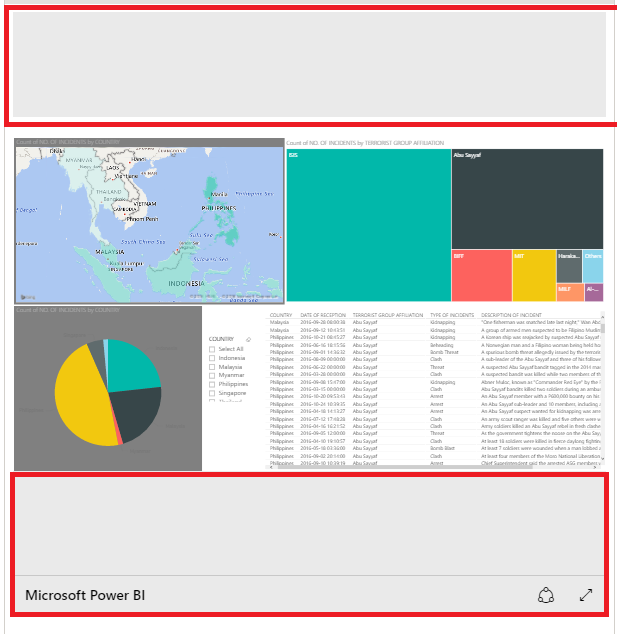
Also, I have a 'country' and 'location' column in my dataset. If i enter more than one location in the 'location' field, for example, Java, Jakarta, Bali, will it show up in three different spots on the powerbi map?

- Mark as New
- Bookmark
- Subscribe
- Mute
- Subscribe to RSS Feed
- Permalink
- Report Inappropriate Content
Hi @sengyap,
You can modify the width property and height property to resize the embedded map size.
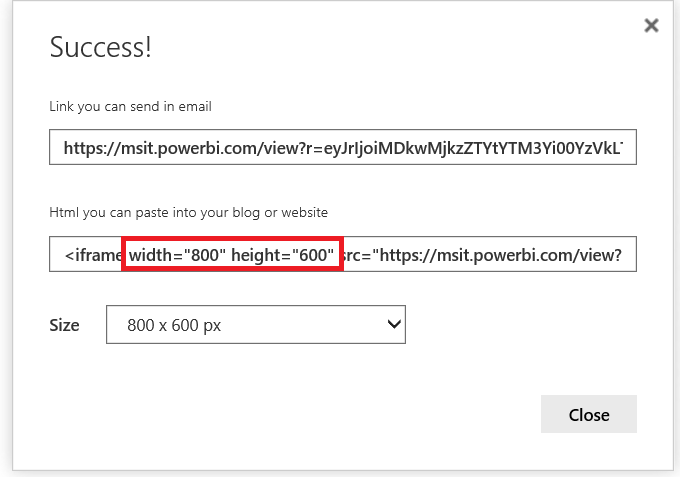
>>Also, I have a 'country' and 'location' column in my dataset. If i enter more than one location in the 'location' field, for example, Java, Jakarta, Bali, will it show up in three different spots on the powerbi map?
I think it not support this feature.
Regards,
Xiaoxin Sheng
- Mark as New
- Bookmark
- Subscribe
- Mute
- Subscribe to RSS Feed
- Permalink
- Report Inappropriate Content
Dear Xiaoxin,
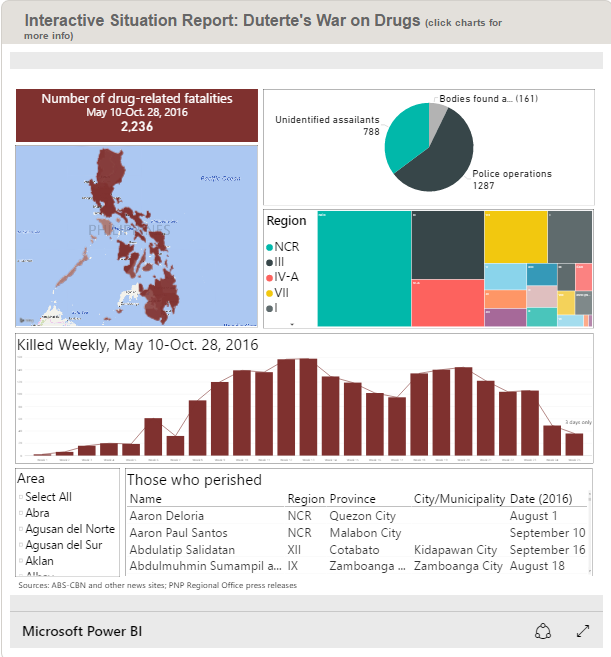
I tried to modify the width and height property like you suggested. I switched it to 800 and 933 width, but the empty space becomes bigger. 680 width will make the report look very small.

Is there a way to make the report fits the screen like this? I am not sure how the creator did this.
- Mark as New
- Bookmark
- Subscribe
- Mute
- Subscribe to RSS Feed
- Permalink
- Report Inappropriate Content
Dear Xiaoxin,
I have a column that contains URL links. However, when I import my data into Powerbi Service, the URL becomes text; there is no hyperlink property.
May I know if there is a way to keep the hyperlink property?
Regards,
Seng Yap
- Mark as New
- Bookmark
- Subscribe
- Mute
- Subscribe to RSS Feed
- Permalink
- Report Inappropriate Content
Hi @sengyap,
I think you can setting data category to solve this issue.(only power bi desktop support these features)
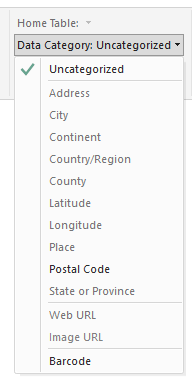
Regards,
Xiaoxin Sheng
- Mark as New
- Bookmark
- Subscribe
- Mute
- Subscribe to RSS Feed
- Permalink
- Report Inappropriate Content
I have one more question.
I am using the scatter plot function, and for one of the features "play axis", I chose "month". However, it does not sort according to ascending order (i.e., Jan, Feb,..) instead it sorts alphabetically. I tried converting it to 1 (Jan), 2 (Feb), but it still does not sort numerically.
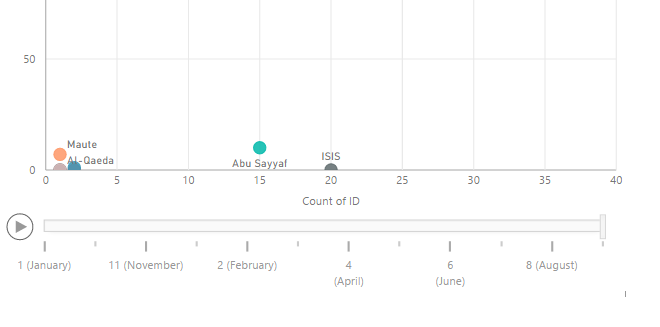
Do you have a solution for this?
- Mark as New
- Bookmark
- Subscribe
- Mute
- Subscribe to RSS Feed
- Permalink
- Report Inappropriate Content
I am using powerbi service.
Helpful resources

Fabric Community Sticker Challenge - Barcelona 2026
If you love stickers, then you will definitely want to check out our community sticker challenge, Barcelona edition!

Power BI Monthly Update - July 2026
Check out the July 2026 Power BI update to learn about new features.

Power BI DataViz World Championships - June 2026
A new Power BI DataViz World Championship is coming this June! Don't miss out on submitting your entry.

| User | Count |
|---|---|
| 10 | |
| 10 | |
| 9 | |
| 9 | |
| 5 |


