Join us at FabCon Atlanta from March 16 - 20, 2026, for the ultimate Fabric, Power BI, AI and SQL community-led event. Save $200 with code FABCOMM.
Register now!The Power BI Data Visualization World Championships is back! Get ahead of the game and start preparing now! Learn more
Hello everyone!
I would like to add a dataflow to my dataset in power bi service/ online.
The source is impala.
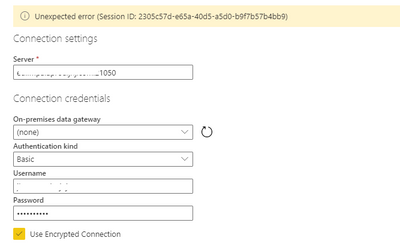
The connection works perfectly at PBI Desktop but online I always get this failure:
Session ID: f402bdec-e334-46da-879b-4c2820d8cef3
What does that mean?
What did I forget?
Hi @joshua1990 ,
You may enter into Query Editor of Power BI Desktop, copy the codes in Advanced Editor for this Impala query, then go to Dataflow ,create a Blank query, paste the copied codes into the Advanced Editor.
Best Regards,
Amy
Community Support Team _ Amy
If this post helps, then please consider Accept it as the solution to help the other members find it more quickly.
Can you please post the entire error message?
The Power BI Data Visualization World Championships is back! Get ahead of the game and start preparing now!
| User | Count |
|---|---|
| 56 | |
| 55 | |
| 32 | |
| 18 | |
| 14 |