
cancel
Showing results for 
Search instead for 
Did you mean: 

Get Fabric Certified for FREE during Fabric Data Days. Don't miss your chance! Request now

Reply
RBunting
Advocate III
Advocate III

I want to remove a dataflow, is there any way to see if it is being consumed by someone?

We have a group of dataflows that we built almost two years ago and I'm pretty sure that no one is consuming this content.  I'd like to remove them, but I need to reassure the administrators that this would have zero impact.  


is there any way to monitor/discover if a dataflow is being consumed by another report?

1 ACCEPTED SOLUTION
Anonymous
Not applicable

Hi, 


 You can use data flow metrics.


https://powerbi.microsoft.com/en-us/blog/paginated-report-metrics-and-dataflow-metrics-now-available...


If this post helps, then please consider Accept it as the solution to help the other members find it more quickly.


Thanks,

Shanthakumar.

View solution in original post

6 REPLIES 6
Anonymous
Not applicable

Hi, 


 You can use data flow metrics.


https://powerbi.microsoft.com/en-us/blog/paginated-report-metrics-and-dataflow-metrics-now-available...


If this post helps, then please consider Accept it as the solution to help the other members find it more quickly.


Thanks,

Shanthakumar.

v-henryk-mstf
Community Support
Community Support

Hi @RBunting ,


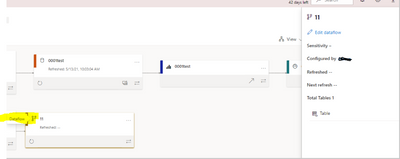
Yes, you can use the lineage view function. You can see the lineage relationship between all projects in the workspace and all their external dependencies. It shows the connections between all workspace items, including connections to dataflows (upstream and downstream).


The prerequisite is that a pro account or a user with access rights to the workspace is required.

vhenrykmstf_0-1623913900366.png

vhenrykmstf_1-1623915178390.png


related document link: Data lineage - Power BI | Microsoft Docs


If there is still confusion, let me know immediately. Llooking forward to your reply.

Best Regards,
Henry

If this post helps, then please consider Accept it as the solution to help the other members find it more quickly.

I don't believe downstream dataflows consuming from the target dataflow outside of the current Workspace will be shown.

EDIT: yes, this is in the documentation too "Currently, the lineage view scope for dataflows is limited to what exists in the current workspace."

jeffshieldsdev
Solution Sage
Solution Sage

The Linage View won't show you all dataflows that may be consuming from the target dataflow.

In the past I've found dataflows that had an upstream dataflow deleted would become corrupted and uneditable. I would have to delete and recreate the dataflow downstream of the deleted one, which would get a new GUID and impact consumers downstream of that. It's possible this issue has been fixed.

After getting burnt a couple times, I no longer delete dataflows, just rename with prefix "zzOld_2021-06-16_".

I just tested this, and deleting upstream dataflows no longer corrupts downstream dataflows consuming from them--less risk in deleting now.

aj1973
Community Champion
Community Champion

Hi @RBunting 

In here you should get the answer

aj1973_0-1623776365778.png

aj1973_1-1623776419099.png


Regards
Amine Jerbi

If I answered your question, please mark this thread as accepted
and you can follow me on
My Website, LinkedIn and Facebook

Helpful resources

Announcements
November Power BI Update Carousel

Power BI Monthly Update - November 2025

Check out the November 2025 Power BI update to learn about new features.

Fabric Data Days Carousel

Fabric Data Days

Advance your Data & AI career with 50 days of live learning, contests, hands-on challenges, study groups & certifications and more!

FabCon Atlanta 2026 carousel

FabCon Atlanta 2026

Join us at FabCon Atlanta, March 16-20, for the ultimate Fabric, Power BI, AI and SQL community-led event. Save $200 with code FABCOMM.

Top Solution Authors
Top Kudoed Authors