cancel
Showing results for 
Search instead for 
Did you mean: 

Get Fabric Certified for FREE during Fabric Data Days. Don't miss your chance! Request now

Reply
Anonymous
Not applicable

How to ignore dimension only for LY measures?

I am trying to build a report… I have a fact with Revenue and dimensions: Date, Client, ClientType.


ClientType table:

CustomerNo

FY

Type

1

2018

xyz

1

2019

xyzz

1

2020

xyzz

1

2021

xyzz2

2

2018

xyz

2

2019

xyz

2

2020

xyz

2

2021

xyz2


For each Year, each customer has a Type.


In the report, a single-selection filter on FY will be included.


My goal is, if FY 2021 is selected:

  •  Revenue for FY 2021 should be displayed.
  • The Type for FY 2021 should be displayed.
  • I have one LY measure on revenue that should display values under type from FY2021, not FY2020!


Likewise if FY 2020 is displayed, the LY  measures, shall display under the type of FY 2020.


Can the above be achieved? Can/shall I connect Date table with ClientType (even though they have different granularity?)

1 ACCEPTED SOLUTION
Anonymous
Not applicable

Hi  @Anonymous ,

I created some data:

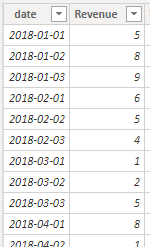
Date Table:

vyangliumsft_0-1631501299161.png

Here are the steps you can follow:

1. Create calculated column.

Year = YEAR('Date'[date])

2. Connect the two tables

vyangliumsft_1-1631501299165.png

3. Create measure.

Measure =
var _select=SELECTEDVALUE('ClientType table'[FY])
return
CALCULATE(SUM('Date'[Revenue]),FILTER(ALL('Date'),
'Date'[Year]=_select
))

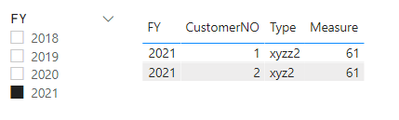
4. Result:

vyangliumsft_2-1631501299167.png

If it does not meet your expected results, can you share sample data and sample output in table format? Or a sample pbix after removing sensitive data.


Best Regards,

Liu Yang

If this post helps, then please consider Accept it as the solution to help the other members find it more quickly


View solution in original post

1 REPLY 1
Anonymous
Not applicable

Hi  @Anonymous ,

I created some data:

Date Table:

vyangliumsft_0-1631501299161.png

Here are the steps you can follow:

1. Create calculated column.

Year = YEAR('Date'[date])

2. Connect the two tables

vyangliumsft_1-1631501299165.png

3. Create measure.

Measure =
var _select=SELECTEDVALUE('ClientType table'[FY])
return
CALCULATE(SUM('Date'[Revenue]),FILTER(ALL('Date'),
'Date'[Year]=_select
))

4. Result:

vyangliumsft_2-1631501299167.png

If it does not meet your expected results, can you share sample data and sample output in table format? Or a sample pbix after removing sensitive data.


Best Regards,

Liu Yang

If this post helps, then please consider Accept it as the solution to help the other members find it more quickly


Helpful resources

Announcements
November Power BI Update Carousel

Power BI Monthly Update - November 2025

Check out the November 2025 Power BI update to learn about new features.

Fabric Data Days Carousel

Fabric Data Days

Advance your Data & AI career with 50 days of live learning, contests, hands-on challenges, study groups & certifications and more!

FabCon Atlanta 2026 carousel

FabCon Atlanta 2026

Join us at FabCon Atlanta, March 16-20, for the ultimate Fabric, Power BI, AI and SQL community-led event. Save $200 with code FABCOMM.

Top Solution Authors
Top Kudoed Authors