cancel
Showing results for 
Search instead for 
Did you mean: 

The Power BI Data Visualization World Championships is back! Get ahead of the game and start preparing now! Learn more

Reply
dancarr22
Helper V
Helper V

How to identify table size in Power BI Pro Service? We are > 1 GB which is breaking model.

Hello,


We are Power BI PRo users.  We have a data model that suddenly surpassed the max 1GB size.

The data model has multiple tables.  How can we find out which one (or several) tables are most responsible for surpassing the size limit?

Are there any diagnostic tools available in Pro to help with this?  Realize there are tools in Premium but we are not Premium clients and it is a big jump in $.

Appreciate any help you can provide.


Thanks,

Dan

1 ACCEPTED SOLUTION

Thanks - found these tools to help - per your reply.


https://www.sqlbi.com/articles/data-model-size-with-vertipaq-analyzer/


Closing ticket - thanks for your help

View solution in original post

4 REPLIES 4
v-gizhi-msft
Community Support
Community Support

Hi,


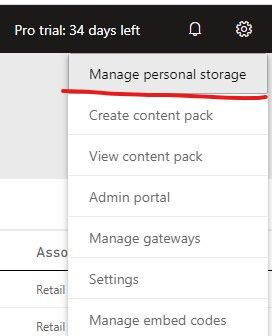
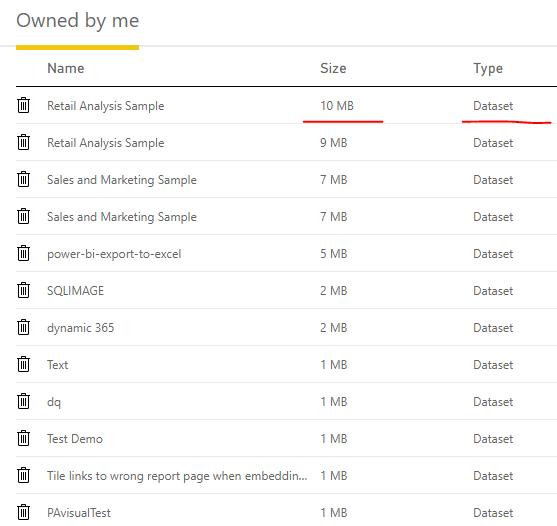
You can view your dataset size on Power BI Service->Setting->Manage personal storage:

2.jpg

35.PNG

Hope this helps.


Best Regards,

Giotto

Thanks @v-gizhi-msft (Giotto)


I should have been clearer in my description - I can see that value for the entire dataset/data model.  But, I need to know the size of the individual tables within the dataset so I know which I need to filter down more to get below 1GB.   How do I get this more granular detail?


Thanks,

Dan 

Hi,


There is no such function on Power BI Service.

And i think you can download the pbix file and try to use DAX Studio to show each table's size.


Best Regards,

Giotto

Thanks - found these tools to help - per your reply.


https://www.sqlbi.com/articles/data-model-size-with-vertipaq-analyzer/


Closing ticket - thanks for your help

Helpful resources

Announcements
Power BI DataViz World Championships

Power BI Dataviz World Championships

The Power BI Data Visualization World Championships is back! Get ahead of the game and start preparing now!

November Power BI Update Carousel

Power BI Monthly Update - November 2025

Check out the November 2025 Power BI update to learn about new features.

FabCon Atlanta 2026 carousel

FabCon Atlanta 2026

Join us at FabCon Atlanta, March 16-20, for the ultimate Fabric, Power BI, AI and SQL community-led event. Save $200 with code FABCOMM.