cancel
Showing results for 
Search instead for 
Did you mean: 

The Power BI Data Visualization World Championships is back! Get ahead of the game and start preparing now! Learn more

Reply
Anonymous
Not applicable

How to find a specific ABAP CDS view used in which Power BI reports/datasets

Hi All,

I'm new to Power BI. My client is using SAP S/4 HANA ERP and developed lot of ABAP CDS views. We are consuming those CDS views in Power BI reports. Frequently ABAP CDS views are updated based on client reporting requirement and we would like to know which Power BI reports are impacted for updating a particular ABAP CDS view. 


Is there a way for Power BI Admin to search all Power BI reports or Datasets in all workspaces within the organization and find out which Power BI reports are consuming a Particular ABAP CDS view ? Please guide us.


Thank You

JayChinnappan

2 REPLIES 2
v-yanjiang-msft
Community Support
Community Support

Hi @Anonymous ,

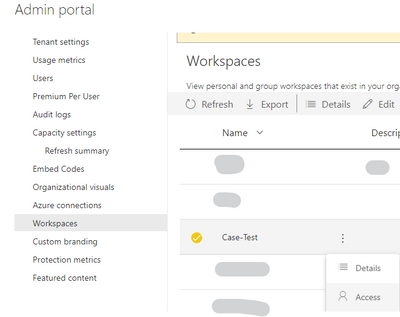
A tenant admin can't automatically view any workspace but they have the permission to add themselves to any workspace via the admin portal workspaces controls.

vkalyjmsft_0-1638493948778.png


Reference: How Much Data Can a Power BI Administrator Access? — Coates Data Strategies

Best Regards,
Community Support Team _ kalyj

If this post helps, then please consider Accept it as the solution to help the other members find it more quickly.

lbendlin
Super User
Super User

The workspace members can run DMV queries to enumerate all partition queries.  Power BI admins can only do that after adding themselves to the workspaces.

Helpful resources

Announcements
Power BI DataViz World Championships

Power BI Dataviz World Championships

The Power BI Data Visualization World Championships is back! Get ahead of the game and start preparing now!

December 2025 Power BI Update Carousel

Power BI Monthly Update - December 2025

Check out the December 2025 Power BI Holiday Recap!

FabCon Atlanta 2026 carousel

FabCon Atlanta 2026

Join us at FabCon Atlanta, March 16-20, for the ultimate Fabric, Power BI, AI and SQL community-led event. Save $200 with code FABCOMM.