FabCon is coming to Atlanta
Join us at FabCon Atlanta from March 16 - 20, 2026, for the ultimate Fabric, Power BI, AI and SQL community-led event. Save $200 with code FABCOMM.
Register now!- Power BI forums
- Get Help with Power BI
- Desktop
- Service
- Report Server
- Power Query
- Mobile Apps
- Developer
- DAX Commands and Tips
- Custom Visuals Development Discussion
- Health and Life Sciences
- Power BI Spanish forums
- Translated Spanish Desktop
- Training and Consulting
- Instructor Led Training
- Dashboard in a Day for Women, by Women
- Galleries
- Data Stories Gallery
- Themes Gallery
- Contests Gallery
- QuickViz Gallery
- Quick Measures Gallery
- Visual Calculations Gallery
- Notebook Gallery
- Translytical Task Flow Gallery
- TMDL Gallery
- R Script Showcase
- Webinars and Video Gallery
- Ideas
- Custom Visuals Ideas (read-only)
- Issues
- Issues
- Events
- Upcoming Events
The Power BI Data Visualization World Championships is back! Get ahead of the game and start preparing now! Learn more
- Power BI forums
- Forums
- Get Help with Power BI
- Service
- How do you change the picture on a published app?
- Subscribe to RSS Feed
- Mark Topic as New
- Mark Topic as Read
- Float this Topic for Current User
- Bookmark
- Subscribe
- Printer Friendly Page


- Mark as New
- Bookmark
- Subscribe
- Mute
- Subscribe to RSS Feed
- Permalink
- Report Inappropriate Content
How do you change the picture on a published app?
On the website it says "Select Workspaces, select the ellipsis (...) next to the name of the workspace, then Members"
I don't have a members option and can't change it in Office 360 either


- Mark as New
- Bookmark
- Subscribe
- Mute
- Subscribe to RSS Feed
- Permalink
- Report Inappropriate Content
Hello,
I figured out how to update the photo when your tenant does not have Exchange Online licenses and when you do not see the "Members" option. I know this is an older post but it popped up in my searching so posting this here in case it can benefit someone else in their searching.
Caption below each screenshot contains instructions:
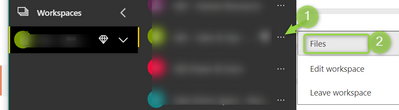

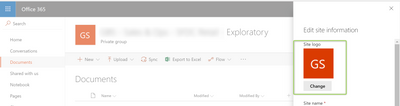
In case the screenshots do not upload correctly, here are detailed written instructions:
- Click on "Files" where the instructions tell you to click on Members. This opens up the SharePoint page associated with the Power BI Workspace where files can be stored. You should see the title of your workspace and the associated photo
- Click on the gear icon in the top righthand corner of the SharePoint page. Then, click on "Site Information"
- A pane slides up where you can udpate the site information. You should see the photo and click "Change" below it.
- Once you select a photo and click Save, the picture did not update for me right away. It took about 5 minutes for it to show up on that SharePoint page as well as in Power BI
Thanks!
- Mark as New
- Bookmark
- Subscribe
- Mute
- Subscribe to RSS Feed
- Permalink
- Report Inappropriate Content
- Mark as New
- Bookmark
- Subscribe
- Mute
- Subscribe to RSS Feed
- Permalink
- Report Inappropriate Content

- Mark as New
- Bookmark
- Subscribe
- Mute
- Subscribe to RSS Feed
- Permalink
- Report Inappropriate Content


- Mark as New
- Bookmark
- Subscribe
- Mute
- Subscribe to RSS Feed
- Permalink
- Report Inappropriate Content
Hi @xbrenes,
As described in this article, to add an image to published App, you need an Exchange Online license. You could contact with your Office 365 administrator to assign exchange license to your account. Reference: Understanding the Power BI admin role
Best regards,
Yuliana Gu
If this post helps, then please consider Accept it as the solution to help the other members find it more quickly.


- Mark as New
- Bookmark
- Subscribe
- Mute
- Subscribe to RSS Feed
- Permalink
- Report Inappropriate Content
@xbrenes What do you see next to the app workspace that you created and deployed the app from? Do you know the O365 license you currently hold? My initial thought is that it could be a license issue. (Not having Exchange)
Looking for more Power BI tips, tricks & tools? Check out PowerBI.tips the site I co-own with Mike Carlo. Also, if you are near SE WI? Join our PUG Milwaukee Brew City PUG
- Mark as New
- Bookmark
- Subscribe
- Mute
- Subscribe to RSS Feed
- Permalink
- Report Inappropriate Content
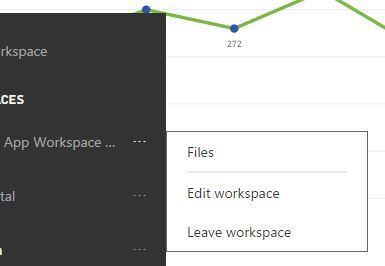
I see no "members" option, and when I go to files, it takes me to O365 but there is no edit option (little pencil icon) on the app picture. Is it only possible to edit icon with 0365?
- Mark as New
- Bookmark
- Subscribe
- Mute
- Subscribe to RSS Feed
- Permalink
- Report Inappropriate Content
@xbrenes In order to have all the files, members etc those are O365 components, so "yes" you would need O365. I don't recall what level currently, or if there is a different way around it with out O365.
Looking for more Power BI tips, tricks & tools? Check out PowerBI.tips the site I co-own with Mike Carlo. Also, if you are near SE WI? Join our PUG Milwaukee Brew City PUG

- Mark as New
- Bookmark
- Subscribe
- Mute
- Subscribe to RSS Feed
- Permalink
- Report Inappropriate Content
@Seth_C_Bauer, is there any reason that the functionality of changing picture of an App comes only with O365 license? Our company has decided to only purchase the Power BI Pro license, and not the full suite of O365. It doesn't quite make sense to limit this functionality to O365 users only, provided that we are planning to roll out the use of Power BI to the whole organization without full adoption of O365. Thanks!

Helpful resources

Power BI Dataviz World Championships
The Power BI Data Visualization World Championships is back! Get ahead of the game and start preparing now!

Power BI Monthly Update - November 2025
Check out the November 2025 Power BI update to learn about new features.

FabCon Atlanta 2026
Join us at FabCon Atlanta, March 16-20, for the ultimate Fabric, Power BI, AI and SQL community-led event. Save $200 with code FABCOMM.


