cancel
Showing results for 
Search instead for 
Did you mean: 

Get Fabric Certified for FREE during Fabric Data Days. Don't miss your chance! Request now

Reply
Bamak
Helper V
Helper V

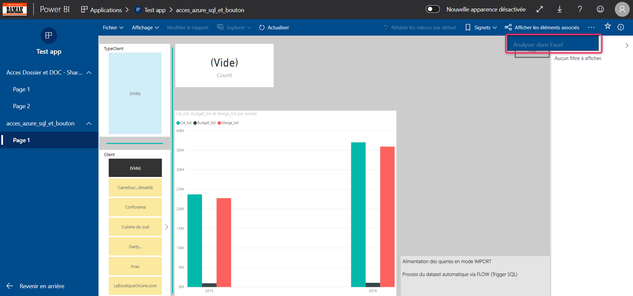
Guest user (different domain) and access via Excel (* .odc) "grayed out" to the dataset

Hi 


I am testing so that my client (@mail  from different tenant) can connect via Excel * .odc to my  workspace dataset
Precisions:

  • No problems to view the report (He owns a PRO license & He's registred on my AAD)
  • I tested 2 types of access: Via App (he has the right of access) 
  • And via a Workspace (he has the viewer right)

Both times, the Excel analysis is grayed out in Service


Is this an limitation for guest users?


Best regards and thanks a lot

2020-02-28_18h27_41.png

1 ACCEPTED SOLUTION
TomMartens
Super User
Super User

Hey @Bamak ,


unfortunately, this is a limitation for guest users: https://powerbi.microsoft.com/en-us/blog/azure-ad-b2b-guest-users-can-now-edit-and-manage-content-in...


Regards,

Tom


Did I answer your question? Mark my post as a solution, this will help others!

Proud to be a Super User!
I accept Kudos 😉
Hamburg, Germany

View solution in original post

1 REPLY 1
TomMartens
Super User
Super User

Hey @Bamak ,


unfortunately, this is a limitation for guest users: https://powerbi.microsoft.com/en-us/blog/azure-ad-b2b-guest-users-can-now-edit-and-manage-content-in...


Regards,

Tom


Did I answer your question? Mark my post as a solution, this will help others!

Proud to be a Super User!
I accept Kudos 😉
Hamburg, Germany

Helpful resources

Announcements
November Power BI Update Carousel

Power BI Monthly Update - November 2025

Check out the November 2025 Power BI update to learn about new features.

Fabric Data Days Carousel

Fabric Data Days

Advance your Data & AI career with 50 days of live learning, contests, hands-on challenges, study groups & certifications and more!

FabCon Atlanta 2026 carousel

FabCon Atlanta 2026

Join us at FabCon Atlanta, March 16-20, for the ultimate Fabric, Power BI, AI and SQL community-led event. Save $200 with code FABCOMM.

Top Solution Authors
Top Kudoed Authors