cancel
Showing results for 
Search instead for 
Did you mean: 

We've captured the moments from FabCon & SQLCon that everyone is talking about, and we are bringing them to the community, live and on-demand. Starts on April 14th. Register now

Reply
acbg
Resolver III
Resolver III

Graph with values as interactable

Is it possible to have two charts interact if it has values instead of categories/axis.


I have two charts: One clustered column chart with 4 values and the other one is a line chart with Month on axis and same 4 values.


When I click on a value in the column chart, I would like the line chart to show only one value. Currently its not interacting.


Is there a way to do this?

1 ACCEPTED SOLUTION

Hi acbg,


The interaction/relationship between charts is based on related columns. In addtion, some chart doesn't support measure while some charts support. So if you need to use measure to filter other chart, there should be related columns.


Regards,

Jimmy Tao

View solution in original post

5 REPLIES 5
v-yuta-msft
Community Support
Community Support

Hi acbg,


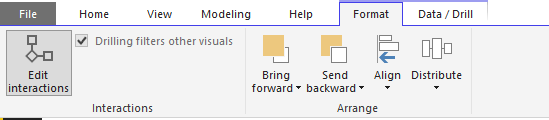
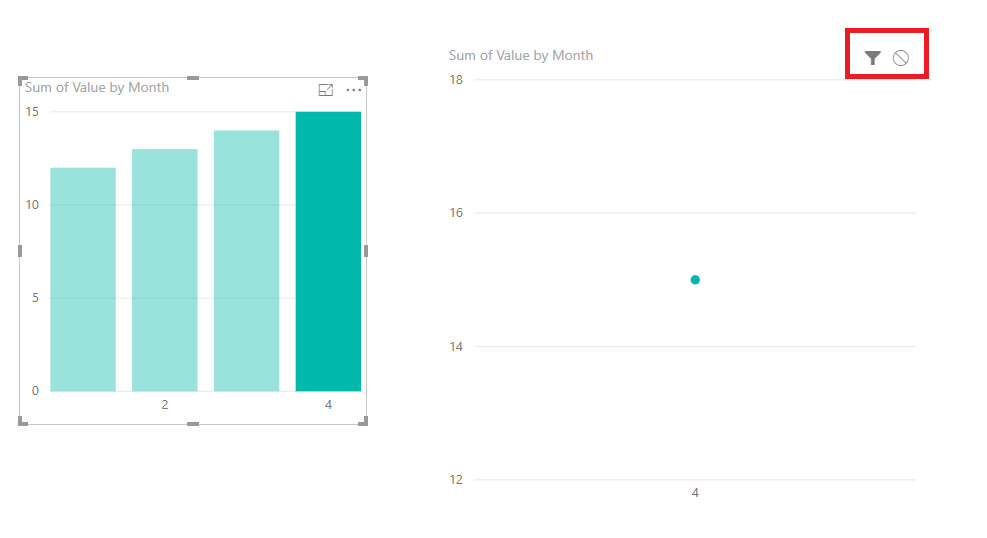
Are both visuals based on same columns in your report? If they are, please click Format-> edit interactions and check if the right-top hand icon in the stacked column visual has been disabled.

Capture.PNGCapture1.PNG 


Regards,

Jimmy Tao

Hi @v-yuta-msft


No they are not disabled.


I only see it working interactable if there is category.


It does not seem to work if its just column values/measures. Is that by design?

Hi acbg,


The interaction/relationship between charts is based on related columns. In addtion, some chart doesn't support measure while some charts support. So if you need to use measure to filter other chart, there should be related columns.


Regards,

Jimmy Tao

Thanks @v-yuta-msft 


that was what I was afraid of as well. There is not a way for the same measures in two graphs to interact without coloumns 😞


Hi acbg, 


Yes, you may share your idea here to let PG knows your requirement.


Regards,

Jimmy Tao

Helpful resources

Announcements
New to Fabric survey Carousel

New to Fabric Survey

If you have recently started exploring Fabric, we'd love to hear how it's going. Your feedback can help with product improvements.

Power BI DataViz World Championships carousel

Power BI DataViz World Championships - June 2026

A new Power BI DataViz World Championship is coming this June! Don't miss out on submitting your entry.

Join our Fabric User Panel

Join our Fabric User Panel

Share feedback directly with Fabric product managers, participate in targeted research studies and influence the Fabric roadmap.

March Power BI Update Carousel

Power BI Community Update - March 2026

Check out the March 2026 Power BI update to learn about new features.

Top Solution Authors