Hi All,
I am trying to embed a report from PowerBI.com to a web app. I have followed the instruction given in the following link
https://powerbi.microsoft.com/en-us/documentation/powerbi-developer-embedding-content/
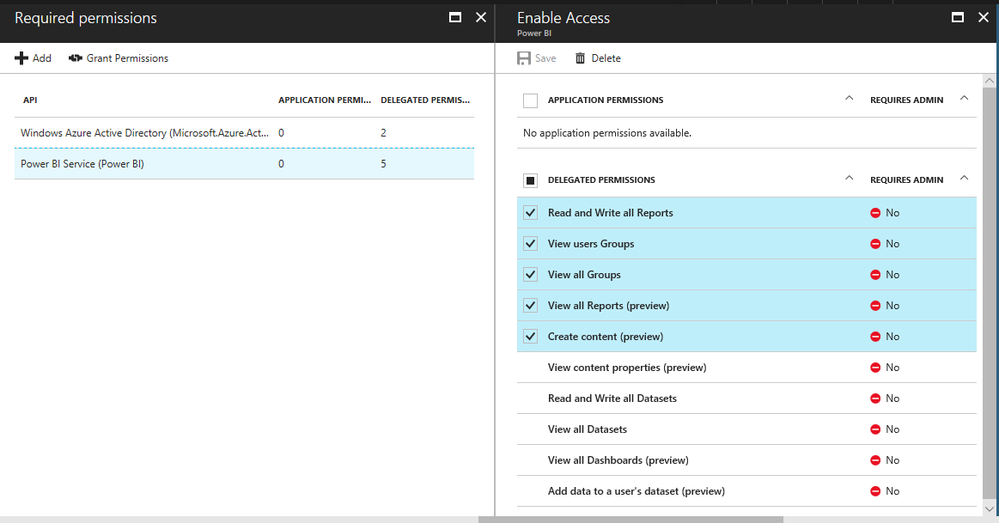
I have registered the app as native. The Azure AD tenant is our companies corporate AD and I have a PowerBI Pro account. So I have created the app in Azure AD and granted the permission to myself. I have also created a test group and assigned a report in that group. I am able to see the reports via code. But when I am trying to generate the report I am getting a forbidden error. Following is the code listing for generating token
public class PowerBIHelper
    {
        private static readonly string Username = ConfigurationManager.AppSettings["pbiUsername"];
        private static readonly string Password = ConfigurationManager.AppSettings["pbiPassword"];
        private static readonly string AuthorityUrl = ConfigurationManager.AppSettings["authorityUrl"];
        private static readonly string ResourceUrl = ConfigurationManager.AppSettings["resourceUrl"];
        private static readonly string ClientId = ConfigurationManager.AppSettings["clientId"];
        private static readonly string ApiUrl = ConfigurationManager.AppSettings["apiUrl"];
        private static readonly string GroupId = ConfigurationManager.AppSettings["groupId"];

        private async Task<PowerBIClient> GetClient()
        {
            // Create a user password cradentials.
            var credential = new UserPasswordCredential(Username, Password);

            // Authenticate using created credentials
            var authenticationContext = new AuthenticationContext(AuthorityUrl);
            var authenticationResult = await authenticationContext.AcquireTokenAsync(ResourceUrl, ClientId, credential);

            if (authenticationResult == null)
            {
                throw new UnauthorizedAccessException("Authentication Failed");
            }

            var tokenCredentials = new TokenCredentials(authenticationResult.AccessToken, "Bearer");

            // Create a Power BI Client object. It will be used to call Power BI APIs.
            return new PowerBIClient(new Uri(ApiUrl), tokenCredentials);
        }


        public async Task<EmbedToken> GenerateTokenAsync(string reportid)
        {
            using (var client = await GetClient())
            {

                var tok = await client.Reports.GenerateTokenInGroupAsync(GroupId, reportid, new GenerateTokenRequest("view")); //.GenerateTokenAsync(reportid, new GenerateTokenRequest("view")); //"Report.ReadWrite.All" //"Report.ReadWrite.All""Report.ReadWrite"
                return tok;
            }
        }

        public async Task<List<Report>> GetAllReportsInGroupAsync()
        {
            using (var client = await GetClient())
            {
                var reports = await client.Reports.GetReportsInGroupAsync(GroupId); //.GetReportsAsync(); //
                return reports.Value.ToList();
            }
        }


    }
Any help would be appreciated.
Regards
Tiklu