
Join us at FabCon Atlanta from March 16 - 20, 2026, for the ultimate Fabric, Power BI, AI and SQL community-led event. Save $200 with code FABCOMM.
Register now!The Power BI Data Visualization World Championships is back! Get ahead of the game and start preparing now! Learn more
Hi Team
I am new in Power BI and working on report. I got stuck at point and need your help.
I have below mention coulumns in a table. in this table, I have Parent task e.g., Test_Timesheets and same has TFSIDTask 67890.
Under this task, we have chield task e.g., Parent TFS task and same has TFSIDTask as well. Every task has taskID and it's task ID will ParentTaskID for chield task.
Now, I need to create another column which shows Parent TFSIDTask for chield. Can someone please help me get Parent TFSIDTask for Chield?
Thanks
Naresh
Solved! Go to Solution.
Hi, @nareshupadhyay
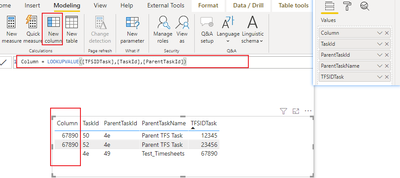
Try to create a column like this:
Column = LOOKUPVALUE([TFSIDTask],[TaskId],[ParentTaskId])
Result:
Please refer to the attachment below for details. Hope this helps.
Best Regards,
Community Support Team _ Zeon Zheng
If this post helps, then please consider Accept it as the solution to help the other members find it more quickly.
Hi, @nareshupadhyay
Try to create a column like this:
Column = LOOKUPVALUE([TFSIDTask],[TaskId],[ParentTaskId])
Result:
Please refer to the attachment below for details. Hope this helps.
Best Regards,
Community Support Team _ Zeon Zheng
If this post helps, then please consider Accept it as the solution to help the other members find it more quickly.
Hi,
I need to get parent TFSIDTask in another Column for its chield. e.g., TFSIDTask 67890 is parent for 23456 and 12345 then I would like to have 67890 in another column infront of 23456 and 12345.
Thanks
Naresh
Hello Naresh,
I am not able to understand your question. Can you explain it a bit more?
Check out the November 2025 Power BI update to learn about new features.
Advance your Data & AI career with 50 days of live learning, contests, hands-on challenges, study groups & certifications and more!