Get Fabric certified for FREE!
Don't miss your chance to take the Fabric Data Engineer (DP-700) exam on us!
Learn more- Power BI forums
- Get Help with Power BI
- Desktop
- Service
- Report Server
- Power Query
- Mobile Apps
- Developer
- DAX Commands and Tips
- Custom Visuals Development Discussion
- Health and Life Sciences
- Power BI Spanish forums
- Translated Spanish Desktop
- Training and Consulting
- Instructor Led Training
- Dashboard in a Day for Women, by Women
- Galleries
- Data Stories Gallery
- Themes Gallery
- Contests Gallery
- QuickViz Gallery
- Quick Measures Gallery
- Visual Calculations Gallery
- Notebook Gallery
- Translytical Task Flow Gallery
- TMDL Gallery
- R Script Showcase
- Webinars and Video Gallery
- Ideas
- Custom Visuals Ideas (read-only)
- Issues
- Issues
- Events
- Upcoming Events
Next up in the FabCon + SQLCon recap series: The roadmap for Microsoft SQL and Maximizing Developer experiences in Fabric. All sessions are available on-demand after the live show. Register now
- Power BI forums
- Forums
- Get Help with Power BI
- Service
- Re: Fiscal Year Calculated Columns
- Subscribe to RSS Feed
- Mark Topic as New
- Mark Topic as Read
- Float this Topic for Current User
- Bookmark
- Subscribe
- Printer Friendly Page

- Mark as New
- Bookmark
- Subscribe
- Mute
- Subscribe to RSS Feed
- Permalink
- Report Inappropriate Content
Fiscal Year Calculated Columns
Hi,
I am trying to create calculated columns that bring out results per Quarter / month per month based on type of caller.

For example
If Month = April and Year = 2018
and Type of caller = "email"
then sum values
I am new to PowerBI, this is what i have managed to piece together.

Any help id greatly appreciated.
Thanks,
Solved! Go to Solution.


- Mark as New
- Bookmark
- Subscribe
- Mute
- Subscribe to RSS Feed
- Permalink
- Report Inappropriate Content
Hi @marcus505,
Yes, here you should update your formula like this.
Measure = CALCULATE(SUM(fabric_swishs[fabric_typeofcaller]),FILTER(fabric_swishs,fabric_swishs[fabric_dateofcall].[Month]="August" && fabric_swishs[fabric_dateofcall].[Year]=2018 && fabric_swishs[fabric_typeofcaller]=

555510002))
Regards,
Frank
If this post helps, then please consider Accept it as the solution to help the others find it more quickly.
- Mark as New
- Bookmark
- Subscribe
- Mute
- Subscribe to RSS Feed
- Permalink
- Report Inappropriate Content
Hi @marcus505,
Based on my test, we can use the formula to get the result as we excepted.
Measure = CALCULATE(SUM(fabric_swishs[values]),FILTER(fabric_swishs,fabric_swishs[month]="April" && fabric_swishs[Year]=2018 && fabric_swishs[Type of caller]="email"))
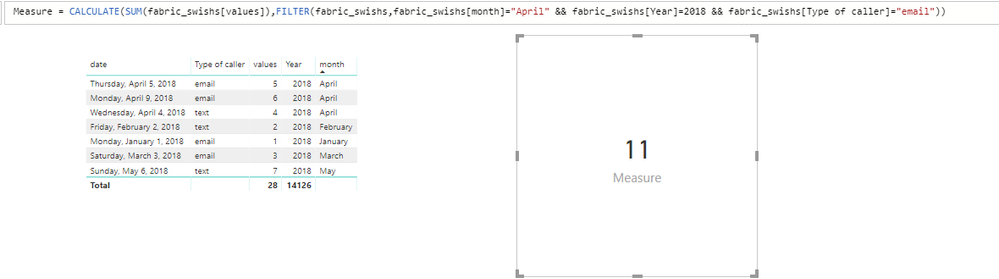
For more details, please check the pbix as attached. If it doesn't meet your requirement, kindly share your sample data to me.
https://www.dropbox.com/s/socoo6aggzse5e7/Fiscal%20Year%20Calculated%20Columns.pbix?dl=0
Regards,
Frank
If this post helps, then please consider Accept it as the solution to help the others find it more quickly.
- Mark as New
- Bookmark
- Subscribe
- Mute
- Subscribe to RSS Feed
- Permalink
- Report Inappropriate Content
Thanks, I used the following but results in an error :
SyntaxEditor Code Snippet
Measure = CALCULATE(SUM(fabric_swishs[fabric_typeofcaller]),FILTER(fabric_swishs,fabric_swishs[fabric_dateofcall].[Month]="August" & fabric_swishs[fabric_dateofcall].[Year]=2018 && fabric_swishs[fabric_typeofcaller]="Family"))
Table name
fabric_swishs
Pick list that has multiple values
fabric_typeofcaller
Month I am filtering on
fabric_dateofcall
Error

- Mark as New
- Bookmark
- Subscribe
- Mute
- Subscribe to RSS Feed
- Permalink
- Report Inappropriate Content
Hi @marcus505,
Could you please share your pbix to me? You can upload your pbix to dorpbox and paste the link here directly.
Regards,
Frank
If this post helps, then please consider Accept it as the solution to help the others find it more quickly.
- Mark as New
- Bookmark
- Subscribe
- Mute
- Subscribe to RSS Feed
- Permalink
- Report Inappropriate Content
- Mark as New
- Bookmark
- Subscribe
- Mute
- Subscribe to RSS Feed
- Permalink
- Report Inappropriate Content
Hi @marcus505,
The highlighted part in your formula, there is no "Family" in the column. So the error will occur. If we delete the part and update the formula to a new one, that will work well.
Measure = CALCULATE(SUM(fabric_swishs[fabric_typeofcaller]),FILTER(fabric_swishs,fabric_swishs[fabric_dateofcall].[Month]="August" && fabric_swishs[fabric_dateofcall].[Year]=2018 && fabric_swishs[fabric_typeofcaller]="Family"))
Measure2 = CALCULATE(SUM(fabric_swishs[fabric_typeofcaller]),FILTER(fabric_swishs,fabric_swishs[fabric_dateofcall].[Month]="August" && fabric_swishs[fabric_dateofcall].[Year]=2018))
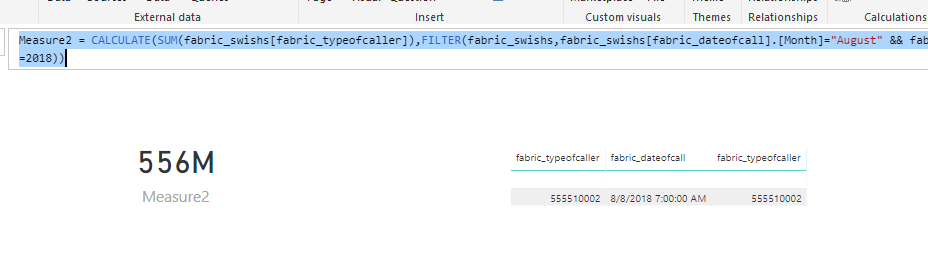
Please check the pbix as attached.
https://www.dropbox.com/s/hbu25f4vct5lbky/FiscalData.pbix?dl=0
Regards,
Frank
If this post helps, then please consider Accept it as the solution to help the others find it more quickly.
- Mark as New
- Bookmark
- Subscribe
- Mute
- Subscribe to RSS Feed
- Permalink
- Report Inappropriate Content
Hi Frank,
Thanks a lot.
Type of caller is a pick list which has multiple values.
Family
Self
Teacher
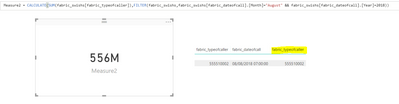
The only filter missing is type of caller. When i applied the filter, i got an error shown in the previous post.
Please let me know if you have any questions.
Thanks,
- Mark as New
- Bookmark
- Subscribe
- Mute
- Subscribe to RSS Feed
- Permalink
- Report Inappropriate Content
Hi Frank,
I was applying the filter by label "Family". As you can see below (this is Dynamics CRM)

So in that case i would need to filter TypeOfCaller by the fieldvalue and sum them i take it rather than Label?
Thanks
- Mark as New
- Bookmark
- Subscribe
- Mute
- Subscribe to RSS Feed
- Permalink
- Report Inappropriate Content
Hi @marcus505,
Yes, here you should update your formula like this.
Measure = CALCULATE(SUM(fabric_swishs[fabric_typeofcaller]),FILTER(fabric_swishs,fabric_swishs[fabric_dateofcall].[Month]="August" && fabric_swishs[fabric_dateofcall].[Year]=2018 && fabric_swishs[fabric_typeofcaller]=

555510002))
Regards,
Frank
If this post helps, then please consider Accept it as the solution to help the others find it more quickly.
- Mark as New
- Bookmark
- Subscribe
- Mute
- Subscribe to RSS Feed
- Permalink
- Report Inappropriate Content
Thanks a lot Frank, Greatly appreciate your help.
I will take it from here.
Thanks,


- Mark as New
- Bookmark
- Subscribe
- Mute
- Subscribe to RSS Feed
- Permalink
- Report Inappropriate Content
You could try this:
My Measure = CALCULATE(SUM(fabric_swishs[Fabric]), TableName[Month] = "April" && TableName[Year] = "2018" && TableName[Type of Caller] = "email")

Helpful resources

New to Fabric Survey
If you have recently started exploring Fabric, we'd love to hear how it's going. Your feedback can help with product improvements.

Power BI DataViz World Championships - June 2026
A new Power BI DataViz World Championship is coming this June! Don't miss out on submitting your entry.

Join our Fabric User Panel
Share feedback directly with Fabric product managers, participate in targeted research studies and influence the Fabric roadmap.

Power BI Community Update - March 2026
Check out the March 2026 Power BI update to learn about new features.


