cancel
Showing results for 
Search instead for 
Did you mean: 

The Power BI Data Visualization World Championships is back! Get ahead of the game and start preparing now! Learn more

Reply
Anonymous
Not applicable

Filter Pane not showing in edit mode of PowerBI Service


I have a PowerBI desktop report where I disabled the filter pane. After I publish to service and view the report, there is no filter pane. Which is fine.


When I open this report in service and turn on edit mode, there is still no filter pane.   Is there a way to enable filter pane in power bi service edit mode for this report?  For some reason, I do not want to republish it.

1 ACCEPTED SOLUTION

Hey @Anonymous ,


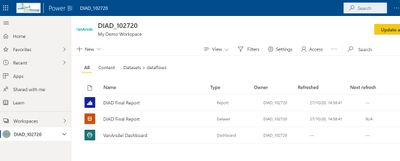
You might be in a different spot.  I am suggesting that you go here (the workspace main screen):

a1.jpg

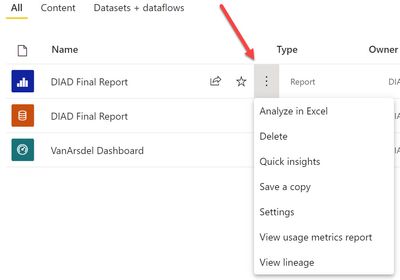
Then, select this elipses and go to settings


a2.jpg


 And then turn these on here:

a3.jpgI would appreciate Kudos if my response was helpful. I would also appreciate it if you would Mark this As a Solution if it solved the problem. Thanks!


Did I answer your question? Mark my post as a solution!

Proud to be a Datanaut!
Private message me for consulting or training needs.


View solution in original post

4 REPLIES 4
collinq
Super User
Super User

Hi @Anonymous ,


It may be that if it is disable in Desktop then it is not available in Service.  However, please try this.  In the service, select the elipses (more options) next to the report in the main page view and then go to Settings.  In settings, go to "FIltering Experience" and select the "Allow users to change filter type" and "Enable search for the filter pane".


Let us know if that resolved it for you!

I would appreciate Kudos if my response was helpful. I would also appreciate it if you would Mark this As a Solution if it solved the problem. Thanks!


Did I answer your question? Mark my post as a solution!

Proud to be a Datanaut!
Private message me for consulting or training needs.


Anonymous
Not applicable

@collinq 

What do you think about the fact that I am unable to to see "Allow users to change filter type"  even in My Workspace. ?  Above is the screenshot of my visibke options.  

Hey @Anonymous ,


You might be in a different spot.  I am suggesting that you go here (the workspace main screen):

a1.jpg

Then, select this elipses and go to settings


a2.jpg


 And then turn these on here:

a3.jpgI would appreciate Kudos if my response was helpful. I would also appreciate it if you would Mark this As a Solution if it solved the problem. Thanks!


Did I answer your question? Mark my post as a solution!

Proud to be a Datanaut!
Private message me for consulting or training needs.


Anonymous
Not applicable

I am not able to see "Allow users to change filter type"  even in My Workspace.


Olajumi_0-1605555117135.png


Helpful resources

Announcements
Power BI DataViz World Championships

Power BI Dataviz World Championships

The Power BI Data Visualization World Championships is back! Get ahead of the game and start preparing now!

December 2025 Power BI Update Carousel

Power BI Monthly Update - December 2025

Check out the December 2025 Power BI Holiday Recap!

FabCon Atlanta 2026 carousel

FabCon Atlanta 2026

Join us at FabCon Atlanta, March 16-20, for the ultimate Fabric, Power BI, AI and SQL community-led event. Save $200 with code FABCOMM.