Share feedback directly with Fabric product managers, participate in targeted research studies and influence the Fabric roadmap.
Sign up nowGet Fabric certified for FREE! Don't miss your chance! Learn more
Hi,
I have a requirement to export to pdf only current active page (including slicer selection).
Example: I have 3 pages in the report and each page has "Export to PDF" button. If I select slicers in the page1 then all other visuals in page 1 are filtered based on selected slicer value. Click "Export to PDF" button in the page 1 then current snapshot of page 1 have to export to pdf. I don't want to see other report pages in the PDF file. Is there a way to achieve this?
Thanks!!!
Hi,
For your problem, i have two workarounds:
1)Copy the original report on Power BI Service and delete the pages you do not want, then export to PDF.
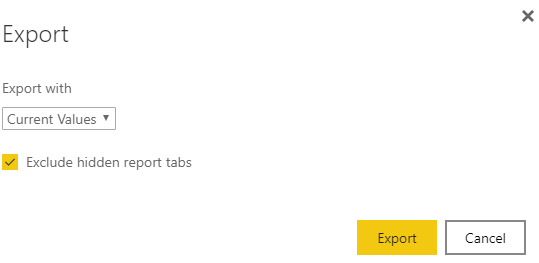
2)Download PBIX file and hide the pages you do not want on Power BI Desktop, then publish to Power BI Service to replace the original report, when export to PDF, remember to select the following option:
Best Regards,
Giotto Zhi
Thanks Giotto. Workarounds suggested by you will not meet my requirement. Is there any alternate approach like python scripting or Microsoft flow or Power apps ?
Hi,
I think python scripting can not work and Microsoft flow and Power apps are beyond my business.
Best Regards,
Giotto Zhi
If you love stickers, then you will definitely want to check out our Community Sticker Challenge!
Check out the January 2026 Power BI update to learn about new features.
| User | Count |
|---|---|
| 19 | |
| 10 | |
| 8 | |
| 7 | |
| 7 |
| User | Count |
|---|---|
| 51 | |
| 43 | |
| 28 | |
| 27 | |
| 25 |