cancel
Showing results for 
Search instead for 
Did you mean: 

The Power BI Data Visualization World Championships is back! Get ahead of the game and start preparing now! Learn more

Reply
Anonymous
Not applicable

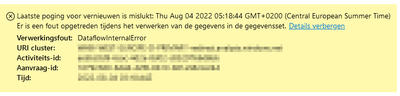
Error message: DataflowInternalError

On refreshing or connecting to a dataflow in Power BI service we get the following error message:

MdePender_0-1659595552408.png

The dataflow contains data from an Azure Gen2 data lake.

Until yesterday all worked fine.

Someone any clue what happened?

Thanks in advance,

M. de Pender

1 ACCEPTED SOLUTION
Anonymous
Not applicable

We have been able to solve this.

What we did: We created a new dataflow on the same data lake that caused the error.
We got an error message saying something wrong with one of the attributes in one of the tables.
After solving this issue all worked fine again

View solution in original post

1 REPLY 1
Anonymous
Not applicable

We have been able to solve this.

What we did: We created a new dataflow on the same data lake that caused the error.
We got an error message saying something wrong with one of the attributes in one of the tables.
After solving this issue all worked fine again

Helpful resources

Announcements
Power BI DataViz World Championships

Power BI Dataviz World Championships

The Power BI Data Visualization World Championships is back! Get ahead of the game and start preparing now!

December 2025 Power BI Update Carousel

Power BI Monthly Update - December 2025

Check out the December 2025 Power BI Holiday Recap!

FabCon Atlanta 2026 carousel

FabCon Atlanta 2026

Join us at FabCon Atlanta, March 16-20, for the ultimate Fabric, Power BI, AI and SQL community-led event. Save $200 with code FABCOMM.