
cancel
Showing results for 
Search instead for 
Did you mean: 

The Power BI Data Visualization World Championships is back! Get ahead of the game and start preparing now! Learn more

Reply
nicolascrespo
Frequent Visitor

Direct Query problem

Hi,

I publish my dashboard on https://app.powerbi.com/ and setup the automatic refresh to my SQL server database trought a personal gateway. 

My problem is with de daily schedule refresh, it isn't working. It says that I have a direct query connection when I havent.

It was working fine, I have other dashboards and they work ok.

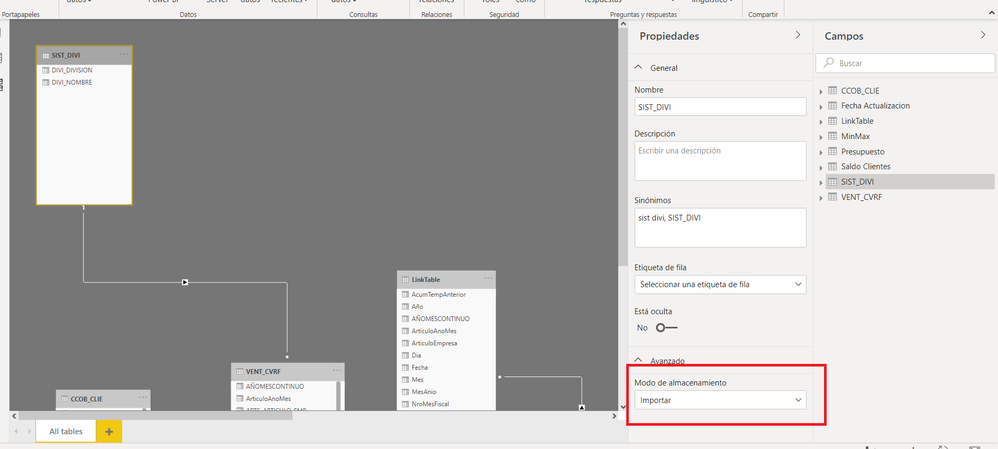
As you can see at the picture below, I checked all my query and they all are on import mode. Like de picture.

I think that there is something wrong with my pbix file.

I just need to schedule an automatic refresh or change the direct query mode to importe mode.

I will appreciate any help.

Thanks,

Nicolas.


print.png


1 ACCEPTED SOLUTION

Hi, 

I solve the problem, there was a problem with de pbix file or app.powerbi.com

I create a new query with direct query mode, after that I  refresh an save de pbix file.

I delete de query created before, refresh and save againg the pbix file. Then I  upload to app.powerbi.com

Now it is ok.


I am not agree with you, It definitely a bug.

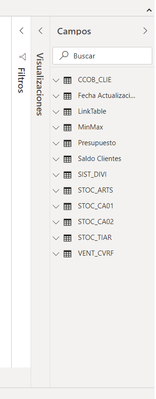
The picture  below with evidence showing before and after.  Something isn't working how it supposed to.


print.png

@lbendlin Thank a lot for the answers!!!


View solution in original post

6 REPLIES 6
v-zhenbw-msft
Community Support
Community Support

Hi @nicolascrespo ,


Please refer this post:
https://community.powerbi.com/t5/Desktop/How-to-change-direct-query-to-import-query/td-p/100996


Or you can try to recreate a pbix using your SQL server database, configure the import data connectivity mode.


Dd1.jpg


If you have any question, please kindly ask here and we will try to resolve it.


Best regards,


Community Support Team _ zhenbw

If this post helps, then please consider Accept it as the solution to help the other members find it more quickly.

Hi @v-zhenbw-msft , thanks for the answer.

The post is 4 years old and PBI change a lot. I can't change between the imports mode and direct query, it is disable.

I was hopping to not to do a PBIX file again, I don't hava that time.

I think there is a bug.

NC

It's not a bug, it is a conscious feature absence decision by Microsoft.  Elsewhere I describe how to manipulate the .pbix file to switch back to Direct Query mode, but that is an entirely unsupported modification.

Hi, 

I solve the problem, there was a problem with de pbix file or app.powerbi.com

I create a new query with direct query mode, after that I  refresh an save de pbix file.

I delete de query created before, refresh and save againg the pbix file. Then I  upload to app.powerbi.com

Now it is ok.


I am not agree with you, It definitely a bug.

The picture  below with evidence showing before and after.  Something isn't working how it supposed to.


print.png

@lbendlin Thank a lot for the answers!!!


lbendlin
Super User
Super User

When you are in visuals mode, what does it say in the bottom right corner?


lbendlin_0-1596586298988.png


This?

Hi @lbendlin , 

It doesen't say anything. 

Last week I changed one or two queries to import mode with an opción that PBI recommended my because there was an incompatibility.

Now I don't have the opción to choose between the import data mode.

Thnaks!!!

print.png


Helpful resources

Announcements
Power BI DataViz World Championships

Power BI Dataviz World Championships

The Power BI Data Visualization World Championships is back! Get ahead of the game and start preparing now!

December 2025 Power BI Update Carousel

Power BI Monthly Update - December 2025

Check out the December 2025 Power BI Holiday Recap!

FabCon Atlanta 2026 carousel

FabCon Atlanta 2026

Join us at FabCon Atlanta, March 16-20, for the ultimate Fabric, Power BI, AI and SQL community-led event. Save $200 with code FABCOMM.