Don't miss your chance to take exam DP-600 or DP-700 on us!
Request nowLearn from the best! Meet the four finalists headed to the FINALS of the Power BI Dataviz World Championships! Register now
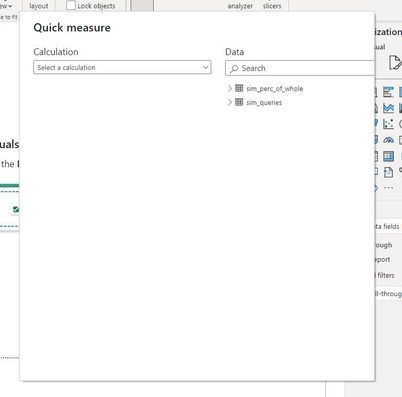
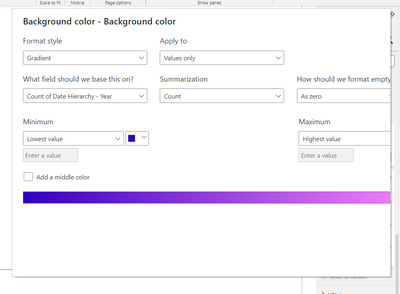
Does anyone have a solution for this? Any time, I use any option that requires the pop up screen on Power BI desktop, it only shows a partial view so I can't use it as there's no option to confirm anything. There is no option to close it within the editor. I cannot move it or resize it. It is driving me nuts.
I've cleared caches, restarted, changed screen resolution. Nothing seems to work.
Solved! Go to Solution.
I've only seen that where screen resolution is an issue, but you say you've tried that.
The only thing I can think of to try is uninstsall Power BI, restart your computer, and try again. Also ensure your PC has the latest updates, both Windows Update and from your PC maker in case there is a BIOS or video driver issue.
DAX is for Analysis. Power Query is for Data Modeling
Proud to be a Super User!
MCSA: BI ReportingJust to add to this and confirm, uninstalling Power BI and reinstalling resolved the issue.
Just to add to this and confirm, uninstalling Power BI and reinstalling resolved the issue.
I've only seen that where screen resolution is an issue, but you say you've tried that.
The only thing I can think of to try is uninstsall Power BI, restart your computer, and try again. Also ensure your PC has the latest updates, both Windows Update and from your PC maker in case there is a BIOS or video driver issue.
DAX is for Analysis. Power Query is for Data Modeling
Proud to be a Super User!
MCSA: BI ReportingShare feedback directly with Fabric product managers, participate in targeted research studies and influence the Fabric roadmap.
Check out the February 2026 Power BI update to learn about new features.