Join us at FabCon Atlanta from March 16 - 20, 2026, for the ultimate Fabric, Power BI, AI and SQL community-led event. Save $200 with code FABCOMM.
Register now!The Power BI Data Visualization World Championships is back! Get ahead of the game and start preparing now! Learn more
Hi everyone,
While I have had this same issue before, the previous solution doesn't seem to be working.
My database (CDS) stores dates in UTC timezone, and I am in AEST (+10). While it displays correctly in desktop, when I publish to service the timezone changes to UTC.
Previously, adding a new column for local date using DAX (i.e UTC + 10/24) solved the problem. This time, however, it seems to be still displaying in UTC... I have also tried adding a new local time column in power query, with the same result.
Have there been any changes to the software that would change this? Or have any of you found another workaround?
Thanks!
Hi @lbendlin ,
Yes - I used DAX to add a new column with the adjusted date, when that didn't work, I used the local date function in power query to create a column from examples with the local time..
Hi @ashleylinkewich ,
Could you pls take a screeshot of your custom column about converting to the UTC time and what is showing in Service?
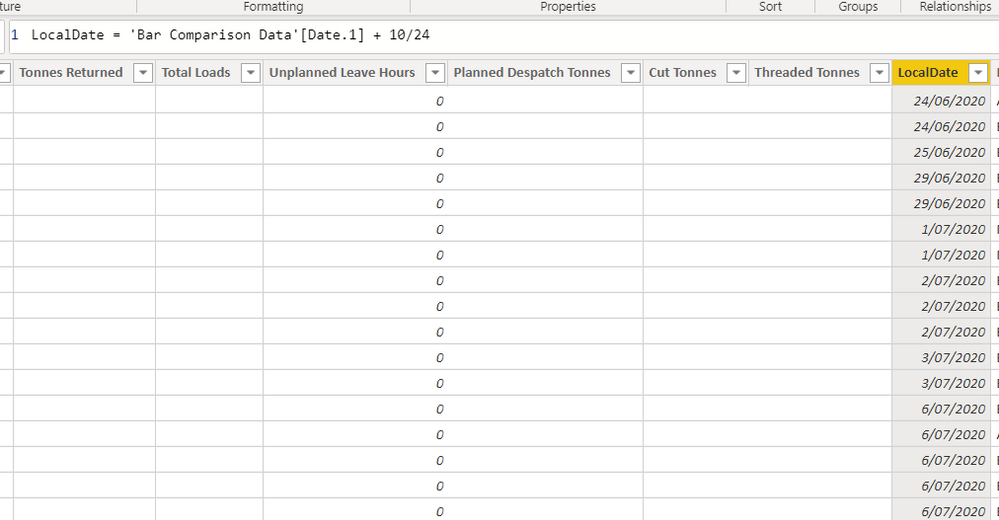
Please see below screenshots. I have created a new column using DAX to create my local time column as pictured. DAX
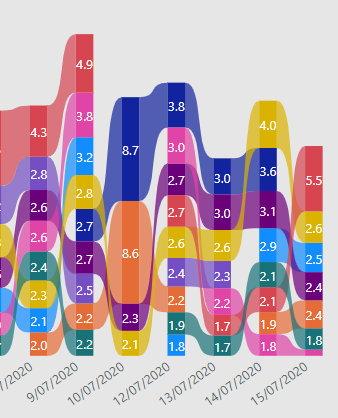
Incorrect Date
Incorrect Date (published in service) pictured above
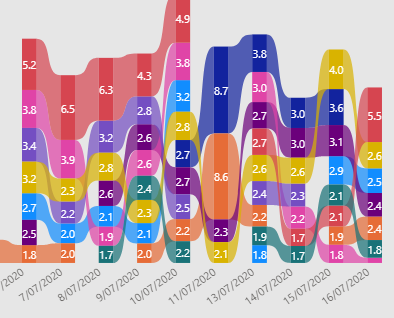
Correct DateCorrect Date pictured above
Hi @ashleylinkewich ,
Check the reference below:
http://cloudbi.com.au/converting-utc-to-local-datetime-in-power-bi/
It can help solve your issue.
I used DateTime.AddZone([Date],10) which seems to work for all of my other reports, but not this one.... Do you have any other suggestions?
Thanks!
The Power BI Data Visualization World Championships is back! Get ahead of the game and start preparing now!
| User | Count |
|---|---|
| 55 | |
| 50 | |
| 43 | |
| 16 | |
| 15 |