cancel
Showing results for 
Search instead for 
Did you mean: 

Get Fabric Certified for FREE during Fabric Data Days. Don't miss your chance! Request now

Reply
ravigol
Frequent Visitor

Datasetsize limit per Service Prinipal

Can we define Datasetsize limit per Service Prinipal in PowerBi Portla?

if yes, what are the setps need to follow to do same?

Can you please share info on this if any.

1 ACCEPTED SOLUTION
v-yueyunzh-msft
Community Support
Community Support

Hi , @ravigol 

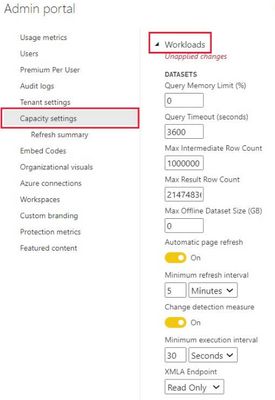
Based on my understanding of the feature of Service Prinipal, it should be used as an authentication vehicle to generate an AAD token to implement some API-side operations, and I'm not very sure about the connection between it and the dataset size you said. According to my understanding, the maximum size supported by dataset size depends on the capacity used by your workspace, if it is Shared capacity, it is 1GB, if it is advanced capacity, it is generally possible to adjust the workload in the capacity settings, you can check this document for details:
How to configure workloads in Power BI Premium - Power BI | Microsoft Learn
 

vyueyunzhmsft_0-1677808190982.png

In addition, the dataset size limit in the Premium capacity also depends on whether you have enabled the "Large dataset" mode, you can check this document for details:
Large datasets in Power BI Premium - Power BI | Microsoft Learn


Thank you for your time and sharing, and thank you for your support and understanding of PowerBI! 


Best Regards,

Aniya Zhang

If this post helps, then please consider Accept it as the solution to help the other members find it more quickly

View solution in original post

1 REPLY 1
v-yueyunzh-msft
Community Support
Community Support

Hi , @ravigol 

Based on my understanding of the feature of Service Prinipal, it should be used as an authentication vehicle to generate an AAD token to implement some API-side operations, and I'm not very sure about the connection between it and the dataset size you said. According to my understanding, the maximum size supported by dataset size depends on the capacity used by your workspace, if it is Shared capacity, it is 1GB, if it is advanced capacity, it is generally possible to adjust the workload in the capacity settings, you can check this document for details:
How to configure workloads in Power BI Premium - Power BI | Microsoft Learn


vyueyunzhmsft_0-1677808190982.png

In addition, the dataset size limit in the Premium capacity also depends on whether you have enabled the "Large dataset" mode, you can check this document for details:
Large datasets in Power BI Premium - Power BI | Microsoft Learn


Thank you for your time and sharing, and thank you for your support and understanding of PowerBI! 


Best Regards,

Aniya Zhang

If this post helps, then please consider Accept it as the solution to help the other members find it more quickly

Helpful resources

Announcements
November Power BI Update Carousel

Power BI Monthly Update - November 2025

Check out the November 2025 Power BI update to learn about new features.

Fabric Data Days Carousel

Fabric Data Days

Advance your Data & AI career with 50 days of live learning, contests, hands-on challenges, study groups & certifications and more!

FabCon Atlanta 2026 carousel

FabCon Atlanta 2026

Join us at FabCon Atlanta, March 16-20, for the ultimate Fabric, Power BI, AI and SQL community-led event. Save $200 with code FABCOMM.

Top Solution Authors
Top Kudoed Authors