Hi @upfaffer ,
Are you referring to the difference between incremental refresh and full refresh of a dataset?
If you choose incremental refresh, first your data source should support query folding. Then set two date ranges, one for the stored data and one for the refresh, like this:
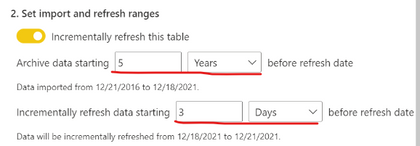
Suppose your data source contains data from 2022-3-25 to today (2022-4-1), and then you set these two ranges: 3 days and 1 day.
| DateTime |
Value |
| 3/25/2022 0:00 |
1 |
| 3/26/2022 0:00 |
2 |
| 3/27/2022 0:00 |
3 |
| 3/28/2022 0:00 |
4 |
| 3/29/2022 0:00 |
5 |
| 3/30/2022 0:00 |
6 |
| 3/31/2022 0:00 |
7 |
| 4/1/2022 0:00 |
8 |
Then modify the values in the data source to
| DateTime |
Value |
| 3/25/2022 0:00 |
1 |
| 3/26/2022 0:00 |
200 |
| 3/27/2022 0:00 |
3 |
| 3/28/2022 0:00 |
4 |
| 3/29/2022 0:00 |
500 |
| 3/30/2022 0:00 |
6 |
| 3/31/2022 0:00 |
90 |
| 4/1/2022 0:00 |
80 |
Then after refreshing on Service, the data in the dataset is
| DateTime |
Value |
| 3/28/2022 0:00 |
4 |
| 3/29/2022 0:00 |
5 |
| 3/30/2022 0:00 |
6 |
| 3/31/2022 0:00 |
90 |
| 4/1/2022 0:00 |
80 |
In other words, incremental refresh only performs refresh operations (insert/delete/update) on the data in the refresh range (3/31/2022 - 4/1/2022(today)).
If you have a large dataset and the data source supports query folding, then incremental refresh is a good choice. For more information, please refer to: Incremental refresh and real-time data for datasets
If you have a small amount of data, or a live connected data source, then use full refresh. For more information, please refer to: Data refresh in Power BI
If the problem is still not resolved, please provide detailed error information or the expected result you expect. Let me know immediately, looking forward to your reply.
Best Regards,
Winniz
If this post helps, then please consider Accept it as the solution to help the other members find it more quickly.


