cancel
Showing results for 
Search instead for 
Did you mean: 

The Power BI Data Visualization World Championships is back! Get ahead of the game and start preparing now! Learn more

Reply
frano72
Helper IV
Helper IV

Dataflow refresh : "An entry with the same key already exists"

Hi, I have a dataflow that references a linked entity and performs some minor transformations.


I am sporadically getting refresh issues with it.  The error is :


Error: An entry with the same key already exists... RootActivityId = xxxxxxxxxxxxxxxxxxxxxxx .Param1 = An entry with the same key already exists. Request ID: xxxxxxxxxxxxxxxxxxxxxxx


What makes it hard to troubleshoot is, usually next refresh it works fine...or if i go and refresh manually.


(I have raised a ticket with Microsoft a week or so back so they are looking into it.)


Would some kind of resource threshold being hit in the service cause these sporadic errors ?  There are some other datflows set to refresh at the same time.

6 REPLIES 6
Samurize24
Frequent Visitor

Hi,

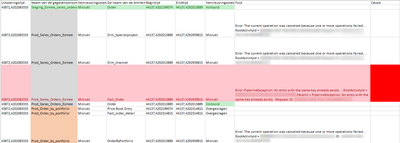
Same issue, with schudele refresh the same error is produced, but when i manuely refresh is works fine.
Any update how to workaround this would be helpfull. 

Samurize24_0-1604314860272.png


Hey @Samurize24 - I never really got to the bottom of it at that time and I was then consumed by another issue...WHICH may have solved the original one.


Have a go at playing around with the enhanced compute engine settings on your dataflow.  What is working for me is having my ingestion dataflows set to optimised.  On my transformation ones i have them set to disabled.  The "key already exists" sounds a lot like a sql type issue doesn't it....and enhanced compute engine has a sql cache behind the scenes.  (I'm still a bit confused on these matters, i've seen the screenshare from microsoft that says one thing (turn them on in transformation) and the matt roche blog seems to suggest not required for transformation - so am going with what i found actually works in practice).


see how you go !

tbowman
Advocate I
Advocate I

@frano72 This is happening quite a bit on several dataflows in another tenant as well. Has MSFT gotten back to you on the issue/solution?

@tbowman - yeah product engineering were working on a fix and it was due to be fixed by Aug 13, but i am still getting the error.


Have followed them up this week, but haven't heard back...

Anonymous
Not applicable

Hi  @frano72,


I cant reproduce your senario and after searching many documents,I failed to solve your issue,so pls create  a support ticket via below link and our relevant personnel will help to handle it.
https://powerbi.microsoft.com/en-us/support/


Best Regards,
Kelly
Did I answer your question? Mark my post as a solution!

Thanks @Anonymous  - I already have a ticket ongoing, i just posted it online in case someone in the community had any ideas.  I'll post back here if Msft come up with anything.

Helpful resources

Announcements
Power BI DataViz World Championships

Power BI Dataviz World Championships

The Power BI Data Visualization World Championships is back! Get ahead of the game and start preparing now!

November Power BI Update Carousel

Power BI Monthly Update - November 2025

Check out the November 2025 Power BI update to learn about new features.

FabCon Atlanta 2026 carousel

FabCon Atlanta 2026

Join us at FabCon Atlanta, March 16-20, for the ultimate Fabric, Power BI, AI and SQL community-led event. Save $200 with code FABCOMM.