Don't miss your chance to take exam DP-600 or DP-700 on us!
Request nowLearn from the best! Meet the four finalists headed to the FINALS of the Power BI Dataviz World Championships! Register now
Hello,
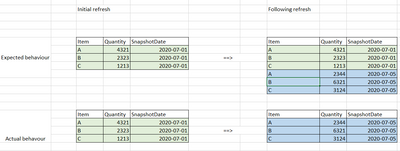
I am working on a requirement to snapshot some data ona weekly basis for Power BI usage.
I tried a solution using Incremental load I have a query with the following logic:
Select ItemCategory, Quantity, GetDate() as SnapshotDate From MyTable |
And I then set incremental loading in my flow baed on the SnapshotDate
-Storing 10 years of data
-Refreshing only last day.
My understanding was that when refreshing this dataflow every few days, the previously extracted data would not be affected (as it is out of the date range, and data would be appended.
What am I missing there ? I could not find in-depths explaination on Incremental refresh that could explain this.
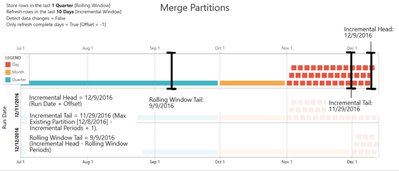
I think this documentation explains it pretty well.
I did read the documentation, from my understanding, when my second reload takes place, the data from my first reload should be in partitions between the rolling window tail and the incremental tail, and thus, not affected by the reload. I do not understand why this data is affected and replaced on later reloads
It may be impacted because the actual partitions are controlled by the Azure service and they are set to "normal" calendar boundaries - days, months, quarters, years. Note that there are no weeks!
So if your incremental window is "two weeks" today it will impact four day partitions and one month partition.
Share feedback directly with Fabric product managers, participate in targeted research studies and influence the Fabric roadmap.
Check out the February 2026 Power BI update to learn about new features.