
Join us at FabCon Atlanta from March 16 - 20, 2026, for the ultimate Fabric, Power BI, AI and SQL community-led event. Save $200 with code FABCOMM.
Register now!The Power BI Data Visualization World Championships is back! Get ahead of the game and start preparing now! Learn more
Hello,
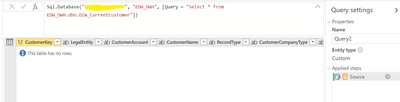
When I connect to SQL Server Query in advanced options in a dataflow, I dont see any data loaded in the table. It just shows the column headers and displays the "table has no rows".
However the same SQL query displays data in Power Query editor in Power BI Desktop and also in SSMS.
It shows as below screenshow in the Power BI dataflow. Any ideas what could be going wrong ? I have even tried to 'Save and Close' and then tried Refreshing the data, but still it did not bring any data and just says - Table has no rows.
Any help would be greatly appreciated.
Thanks,
Neha
Solved! Go to Solution.
Hi @Anonymous
You used basic SQL Query( Select * from TableName) in your dataflow to get data from SQL Sever and you could only get column headers of your table without data.
Will this issue appear when you in dataflow to get data from other table from SQL Sever by SQL Query?
Your SQL Query is correct. I have a test and it works well.
Try to click the "Refresh" button in "Home" pane. If still no data is shown, please clear permissions under "Data Source settings", and establish the connection to dataflow again.
Best Regards,
Rico Zhou
If this post helps, then please consider Accept it as the solution to help the other members find it more quickly.
Hi @Anonymous
You used basic SQL Query( Select * from TableName) in your dataflow to get data from SQL Sever and you could only get column headers of your table without data.
Will this issue appear when you in dataflow to get data from other table from SQL Sever by SQL Query?
Your SQL Query is correct. I have a test and it works well.
Try to click the "Refresh" button in "Home" pane. If still no data is shown, please clear permissions under "Data Source settings", and establish the connection to dataflow again.
Best Regards,
Rico Zhou
If this post helps, then please consider Accept it as the solution to help the other members find it more quickly.
The Power BI Data Visualization World Championships is back! Get ahead of the game and start preparing now!