cancel
Showing results for 
Search instead for 
Did you mean: 

The Power BI Data Visualization World Championships is back! Get ahead of the game and start preparing now! Learn more

Reply
Anonymous
Not applicable

DataFlows - OneDrive Personal Connection

Hi All, I need help connecting a OneDrive Personal file from dataflows. Current I have connected using a download URL taken from Microsoft Graphs but this will not do as the file I need to connect to is overwritten daily, resulting in a 404(Link Changes).


So I need to connect using the filename(delete.xlsx) in the path, I have used the below to connect to delete.xlsx in the root. Excel.Workbook(Web.Contents("https://api.onedrive.com/v1.0/drives/driveId/root:/delete.xlsx"), null, true)


But this is throwing an error Please specify how to connect, in which I don't know what is causing the problem


If I click edit credentials and Anonymous, it just brings be back to the error?Same happens with Basic Auth and Organ. Auth is not clickable. Is this an issue with the Data Gateway?


Thanks

2 REPLIES 2
v-jiascu-msft
Microsoft Employee
Microsoft Employee

Hi @Anonymous,


Since the file will be overwritten frequently, I would suggest you use the connector "SharePoint Folder". Please follow the steps below.

1. Connect to the SharePoint Folder in the Desktop and get the desired contents and then copy the Power Query code in the Advanced Editor.

2. Since the Dataflow is under preview, we will do this with a Blank query. Firstly, we need to create a new Dataflow.

3. Create a blank query and paste the code we copied in step 1.

4. Sign in your account and save the Dataflow.

The key point here is creating a new Dataflow without Data Gateway.


Best Regards,
Dale

Community Support Team _ Dale
If this post helps, then please consider Accept it as the solution to help the other members find it more quickly.

Hi Dale @v-jiascu-msft ,

trying to connect to OneDrive for Business with this method, but still getting authentication error: 

Data source credentials are missing or invalid. Please update the credentials for AzureDataLakeStorage in dataflow settings and try again

Could this be due to multi-factor-authentication enabled?


I'm trying to sign in via OAuth2:


image.png

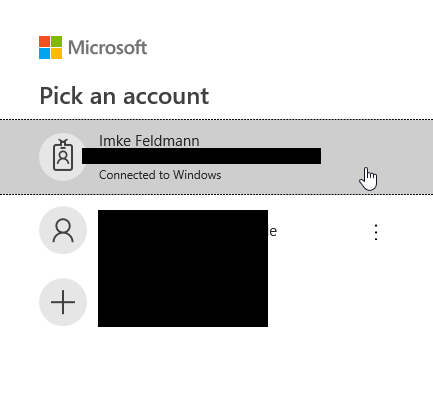
Then pick my account:


image.png

and thats it. Nothing more. Getting errors.

And when I edit the credentials to check, they show this:


image.png

So to me it looks, as if the auth didn't work.

Any ideas why that is?

Thanks.

Imke Feldmann (The BIccountant)

If you liked my solution, please give it a thumbs up. And if I did answer your question, please mark this post as a solution. Thanks!

How to integrate M-code into your solution -- How to get your questions answered quickly -- How to provide sample data -- Check out more PBI- learning resources here -- Performance Tipps for M-queries

Helpful resources

Announcements
November Power BI Update Carousel

Power BI Monthly Update - November 2025

Check out the November 2025 Power BI update to learn about new features.

Fabric Data Days Carousel

Fabric Data Days

Advance your Data & AI career with 50 days of live learning, contests, hands-on challenges, study groups & certifications and more!

FabCon Atlanta 2026 carousel

FabCon Atlanta 2026

Join us at FabCon Atlanta, March 16-20, for the ultimate Fabric, Power BI, AI and SQL community-led event. Save $200 with code FABCOMM.

Top Solution Authors