cancel
Showing results for 
Search instead for 
Did you mean: 

Vote for your favorite vizzies from the Power BI Dataviz World Championship submissions. Vote now!

Reply
gmecwm
New Member

Data Source Changing When Recreating Report/Dashboard

I just built a report & dashboard for this company I'm working for, and my data source was an Excel file on my computer drive. Now that it's finished, I'd like to transfer ownership to my boss. As I've learned from other posts, this can't exactly be done, so I'm using my boss's credentials to essentially recreate the report under his account. The issue I'm concerned about is the fact that the Excel file is still on my computer. If I create the report in his account then send the Excel file to him and he tries to upload the data to update the report, is PowerBI going to be able to do that???

1 ACCEPTED SOLUTION
v-yulgu-msft
Microsoft Employee
Microsoft Employee

Hi @gmecwm,


If I create the report in his account then send the Excel file to him and he tries to upload the data to update the report, is PowerBI going to be able to do that???

Yes. That way, the published report on service is owned by your boss.

But, one thing should be pay attention to is that if your boss just need to view this report on service, without need to refresh data source, there is no matter whether you send the Excel file to him or not since you have imported the Excel data into .pbix file. Anyone who gets this .pbix file can open and read this report on his computer. For refresh, it would fail, although you send the Excel file to him. As the data source location has been changed while the path in Power Query wasn't. You may need to ask your boss to change the file path under Advanced Editor after receiving the .pbix file and excel file.
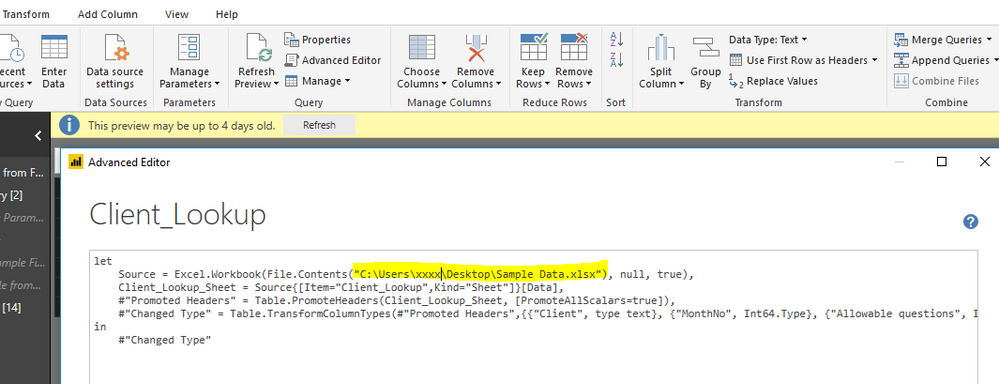
2.PNG


Alternatively, to avoid above step, you can upload the Excel file to your boss's Onedrive. Then, get data from Onedrive to create report, still with your boss's credential.

Reference: Use OneDrive for Business links in Power BI Desktop

Getting OneDrive Files into Power BI Desktop


Best regards,

Yuliana Gu

Community Support Team _ Yuliana Gu
If this post helps, then please consider Accept it as the solution to help the other members find it more quickly.

View solution in original post

2 REPLIES 2
v-yulgu-msft
Microsoft Employee
Microsoft Employee

Hi @gmecwm,


If I create the report in his account then send the Excel file to him and he tries to upload the data to update the report, is PowerBI going to be able to do that???

Yes. That way, the published report on service is owned by your boss.

But, one thing should be pay attention to is that if your boss just need to view this report on service, without need to refresh data source, there is no matter whether you send the Excel file to him or not since you have imported the Excel data into .pbix file. Anyone who gets this .pbix file can open and read this report on his computer. For refresh, it would fail, although you send the Excel file to him. As the data source location has been changed while the path in Power Query wasn't. You may need to ask your boss to change the file path under Advanced Editor after receiving the .pbix file and excel file.

2.PNG


Alternatively, to avoid above step, you can upload the Excel file to your boss's Onedrive. Then, get data from Onedrive to create report, still with your boss's credential.

Reference: Use OneDrive for Business links in Power BI Desktop

Getting OneDrive Files into Power BI Desktop


Best regards,

Yuliana Gu

Community Support Team _ Yuliana Gu
If this post helps, then please consider Accept it as the solution to help the other members find it more quickly.

Thank you so much! This worked perfectly! (:

Helpful resources

Announcements
Power BI DataViz World Championships

Power BI Dataviz World Championships

Vote for your favorite vizzies from the Power BI World Championship submissions!

Sticker Challenge 2026 Carousel

Join our Community Sticker Challenge 2026

If you love stickers, then you will definitely want to check out our Community Sticker Challenge!

January Power BI Update Carousel

Power BI Monthly Update - January 2026

Check out the January 2026 Power BI update to learn about new features.

FabCon Atlanta 2026 carousel

FabCon Atlanta 2026

Join us at FabCon Atlanta, March 16-20, for the ultimate Fabric, Power BI, AI and SQL community-led event. Save $200 with code FABCOMM.