Join us at FabCon Atlanta from March 16 - 20, 2026, for the ultimate Fabric, Power BI, AI and SQL community-led event. Save $200 with code FABCOMM.
Register now!The Power BI Data Visualization World Championships is back! Get ahead of the game and start preparing now! Learn more
Hello everybody!
I have a couple of questions that I could not find any answers from the Internet.
I am working with a high sensitive data. Therefore, I should "hide" them from my clients. So, nobody should see the actual data. They should only see the visuals.
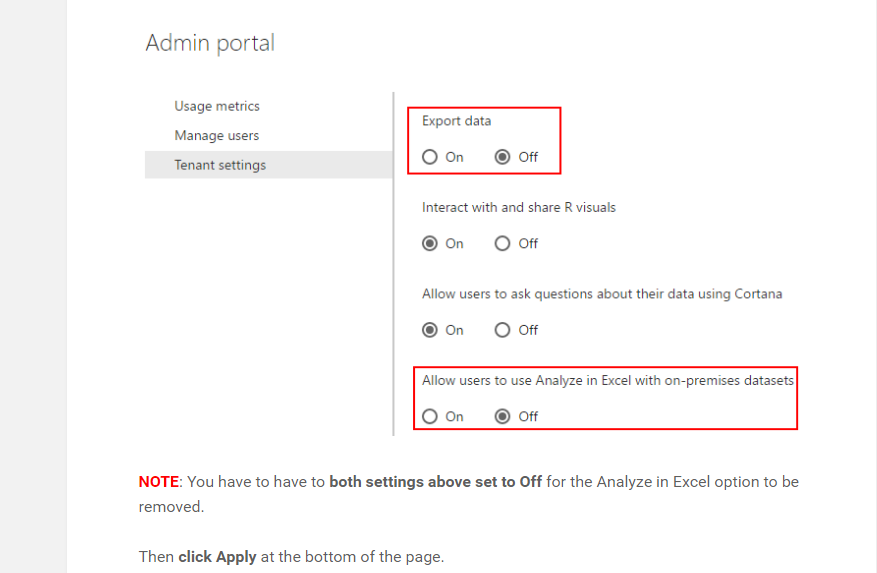
1- There is an option that called "Analyze in Excel" when I share my dashboard with clients. I would like to disable this feature.
2- I have tried to "publish" a map to the web. When hitting right click, there is an option "see records" which shows all data again. I would like to disable the right click or "see records" feature when I publish something.
Thank you!
Solved! Go to Solution.
Hi @burak
To answer the Question 1,
You can disable the analyze in excel in admin portal, You have to have admin rights for this.
For Your Question 2
Currently, There is no direct way to disable see records but before publishing from power bi desktop if you right click columns and hide them then they won't appear under See Records. Alternatively if possible, you change connection based on directquery rather than import and you won't get See records options. You can select which one is prefrred method.
For the future improvements, Please vot at this idea at HERE.
Hi @burak
To answer the Question 1,
You can disable the analyze in excel in admin portal, You have to have admin rights for this.
For Your Question 2
Currently, There is no direct way to disable see records but before publishing from power bi desktop if you right click columns and hide them then they won't appear under See Records. Alternatively if possible, you change connection based on directquery rather than import and you won't get See records options. You can select which one is prefrred method.
For the future improvements, Please vot at this idea at HERE.
The Power BI Data Visualization World Championships is back! Get ahead of the game and start preparing now!
| User | Count |
|---|---|
| 55 | |
| 49 | |
| 44 | |
| 16 | |
| 16 |