Hi there.
I would very much appreciate some guidance on this issue -
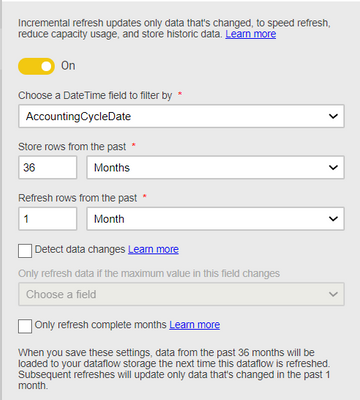
I am trying to create a DataFlow in PowerBI service, with incremental refresh from SQL Server database of a table which updates with a new set of data everyweek. Data table loads fine into PQ online when I connect it for the first time but when I try to run it after enabling the Incremental refresh, the update fails. Any idea what am I missing?
Here are the info and checks done - Weekly data 100k rows, Premium per user Trial mode, Gateway connection configured and running fine and Privacy level set to Organisational and below is the error message. Please note that the incremental refresh is based on a 'ReportDate' column which carries the Reporting week Date stamp for all rows in table and changes every week.
There was a problem refreshing your dataflow. {"RootActivityId":"14467eb1-2df9-1212-95d8-8c2df798650d", ErrorMessage:"Encountered user gateway exception: '[DM_ErrorDetailNameCode_UnderlyingErrorCode]=-2147467259 [DM_ErrorDetailNameCode_UnderlyingHResult]=-2147467259 [Microsoft.Data.Mashup.ValueError.Class]=20 [Microsoft.Data.Mashup.ValueError.DataSourceKind]=SQL [Microsoft.Data.Mashup.ValueError.ErrorCode]=-2146232060 [[Microsoft.Data.Mashup.ValueError.Number]=-1 [Microsoft.Data.Mashup.ValueError.Reason]=DataSource.Error [InnerType]=MashupValueException Microsoft SQL: A network-related or instance-specific error occurred while establishing a connection to SQL Server. The server was not found or was not accessible. Verify that the instance name is correct and that SQL Server is configured to allow remote connections. (provider: SQL Network Interfaces, error: 26 - Error Locating Server/Instance Specified) [GatewayPipelineErrorCode]=DM_GWPipeline_Gateway_MashupDataAccessError [ErrorShortName]=GatewayClientErrorResponseException[GatewayId=1021468]/MashupDataAccessValueException[ErrorCode=-2147467259, HResult=-2147467259]/Wrapped(MashupValueException)[ErrorCode=-2147467259, HResult=-2147467259] [ExceptionErrorShortName]=GatewayClientErrorResponseException[GatewayId=1021468]'"}