Join us at FabCon Atlanta from March 16 - 20, 2026, for the ultimate Fabric, Power BI, AI and SQL community-led event. Save $200 with code FABCOMM.
Register now!The Power BI Data Visualization World Championships is back! Get ahead of the game and start preparing now! Learn more
Hi there,
Does anyone know how to create a table of contents in Power BI Report Builder?
I would like it to look like a regular report. First a title page and then a table of contents like:
Chapter 1 ....................... page 2
Chapter 2 ....................... page 4
Chapter 3 ....................... page 5
Is that possible?
Cover page,
This documentation might help you:
Create a document map or table of contents in paginated reports - Microsoft Report Builder & Power B...
This is helpful, but how do I insert a Table of Contents into the report so that it prints on the first page (after the cover)? Also, how will this work with multiple sections to the report?
Hi @IC_1389
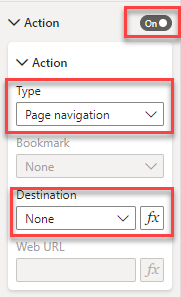
Simply add the button of your choice to your canvas. Based on what you described, blank will work best. Set the text to Chapter 1. Then in the Action settings of the button, turn it on, select page navigation as the type, and then select the page you want to navigate to when the button is clicked. You need to create the page first for it to appear in the drop down.
If you page is based on other selections, you can write a DAX measure to generate the appropriate page name and use that in the fx instrewad of the selection.
Hope this helps.
you can not add a button to a paginated report.
You can use buttons for each chapter with a navigate action to the desired page.
Hope this help!
Hi m-colbert,
Thanks, I'll give that a try! If I make buttons, can I then also add the page number?
Is there an expression to show on which page an object is located:
"Chapter 1" (<-- Ill make this a button) "......................... page " &expression for page number on which "chapter 1" is located?
Thanks!
The Power BI Data Visualization World Championships is back! Get ahead of the game and start preparing now!