
This time we’re going bigger than ever. Fabric, Power BI, SQL, AI and more. We're covering it all. You won't want to miss it.
Learn moreDid you hear? There's a new SQL AI Developer certification (DP-800). Start preparing now and be one of the first to get certified. Register now
Hello,
I just bought a Microsoft 365 license and PowerBI Pro licenses for a customer, I started to create data flow with user user@domain_name.onmicrosoft.com now after domain definitive migration I don't have anymore access to the data flow have already been created and I come across the message "Only the owner can edit the dataflow." with the new domain (user@domain_name.com)
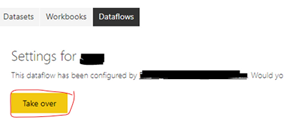
I connected with another user (user2@domain_name.com) and I was able to take control of the dataflows,
now I connected with my user (user@domain_name.com) to regain control of the dataflow, I was able to change my data source, but while trying to modify the dataflow I come across "Only the owner can edit the dataflow"
Solved! Go to Solution.
Hi, @ihebc
According to your description, you can not edit the dataflow even when you take over the dataflow, I think you should first check if your workspace has turned on the edit permission:
You can also press “Ctrl”+”Delete” to clear the cache of your browser, then refresh the page to check if you can edit now.
If you still have a problem, you can post more details about this problem.
More info about Power BI dataflows general availability
Best Regards,
Community Support Team _Robert Qin
If this post helps, then please consider Accept it as the solution to help the other members find it more quickly.
Hi, @ihebc
According to your description, you can not edit the dataflow even when you take over the dataflow, I think you should first check if your workspace has turned on the edit permission:
You can also press “Ctrl”+”Delete” to clear the cache of your browser, then refresh the page to check if you can edit now.
If you still have a problem, you can post more details about this problem.
More info about Power BI dataflows general availability
Best Regards,
Community Support Team _Robert Qin
If this post helps, then please consider Accept it as the solution to help the other members find it more quickly.
Check out the April 2026 Power BI update to learn about new features.
Sign up to receive a private message when registration opens and key events begin.
If you have recently started exploring Fabric, we'd love to hear how it's going. Your feedback can help with product improvements.
| User | Count |
|---|---|
| 12 | |
| 9 | |
| 8 | |
| 8 | |
| 7 |
| User | Count |
|---|---|
| 50 | |
| 27 | |
| 24 | |
| 24 | |
| 22 |