Join us at FabCon Atlanta from March 16 - 20, 2026, for the ultimate Fabric, Power BI, AI and SQL community-led event. Save $200 with code FABCOMM.
Register now!The Power BI Data Visualization World Championships is back! Get ahead of the game and start preparing now! Learn more
Hi,
Does anybody know why I cannot see the same as in the following tutorial: https://docs.microsoft.com/en-us/power-bi/service-real-time-streaming
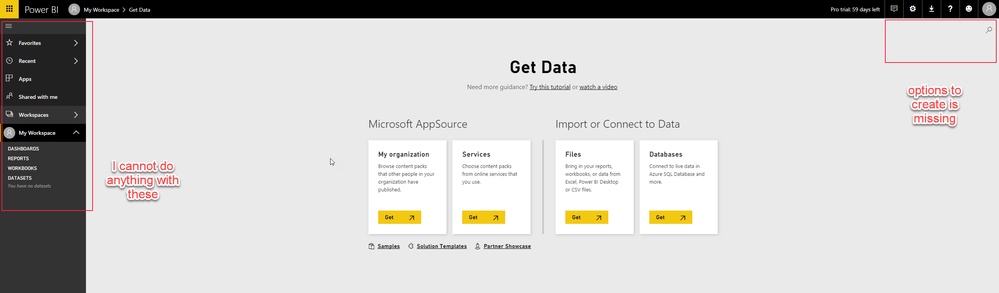
My PowerBI service app looks like this:
Why is that?
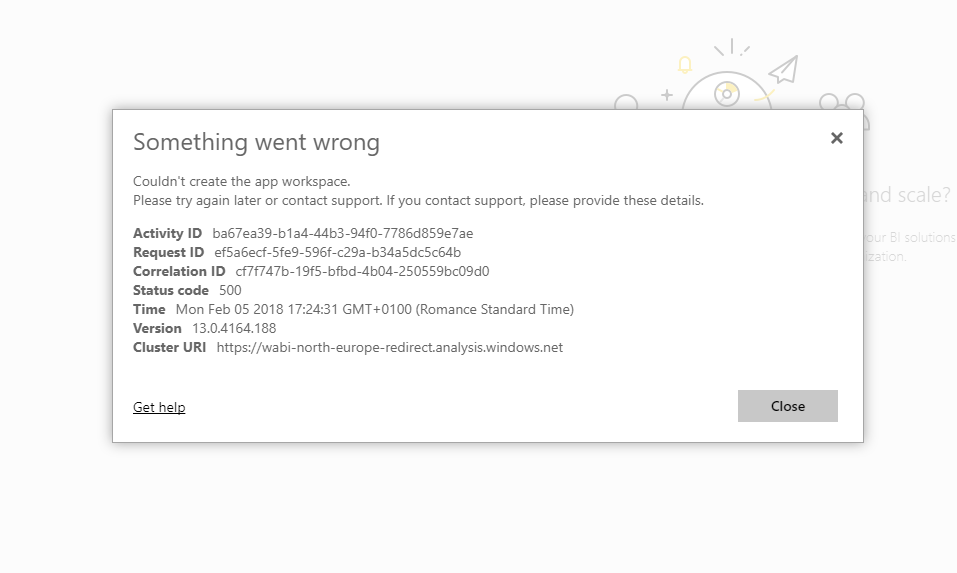
Also, I cannot create any workspaces, it always fails:
Solved! Go to Solution.
@jsvobodacz The streaming dataset can be created from "Datasets", not get data. Go to your Datasets, Click "Create" in the upper right and you will see "Streaming dataset" as an option.
In order to create an App workspace, you need a Pro license. If you have a Pro license, it is possible for your Office 365 admin team to disable the ability to create an App Workspace (Office 365 group).
@jsvobodacz The streaming dataset can be created from "Datasets", not get data. Go to your Datasets, Click "Create" in the upper right and you will see "Streaming dataset" as an option.
In order to create an App workspace, you need a Pro license. If you have a Pro license, it is possible for your Office 365 admin team to disable the ability to create an App Workspace (Office 365 group).
Thanks! This is correct for both issues.
I just could not get around this "get data" until I saw a "skip for now" link and then the option to create and choose streaming data set appeared.![]()
The Power BI Data Visualization World Championships is back! Get ahead of the game and start preparing now!
| User | Count |
|---|---|
| 56 | |
| 56 | |
| 35 | |
| 18 | |
| 14 |