FabCon is coming to Atlanta
Join us at FabCon Atlanta from March 16 - 20, 2026, for the ultimate Fabric, Power BI, AI and SQL community-led event. Save $200 with code FABCOMM.
Register now!- Power BI forums
- Get Help with Power BI
- Desktop
- Service
- Report Server
- Power Query
- Mobile Apps
- Developer
- DAX Commands and Tips
- Custom Visuals Development Discussion
- Health and Life Sciences
- Power BI Spanish forums
- Translated Spanish Desktop
- Training and Consulting
- Instructor Led Training
- Dashboard in a Day for Women, by Women
- Galleries
- Data Stories Gallery
- Themes Gallery
- Contests Gallery
- Quick Measures Gallery
- Notebook Gallery
- Translytical Task Flow Gallery
- TMDL Gallery
- R Script Showcase
- Webinars and Video Gallery
- Ideas
- Custom Visuals Ideas (read-only)
- Issues
- Issues
- Events
- Upcoming Events
To celebrate FabCon Vienna, we are offering 50% off select exams. Ends October 3rd. Request your discount now.
- Power BI forums
- Forums
- Get Help with Power BI
- Service
- Re: Cannot read properties of undefined (reading '...
- Subscribe to RSS Feed
- Mark Topic as New
- Mark Topic as Read
- Float this Topic for Current User
- Bookmark
- Subscribe
- Printer Friendly Page

- Mark as New
- Bookmark
- Subscribe
- Mute
- Subscribe to RSS Feed
- Permalink
- Report Inappropriate Content
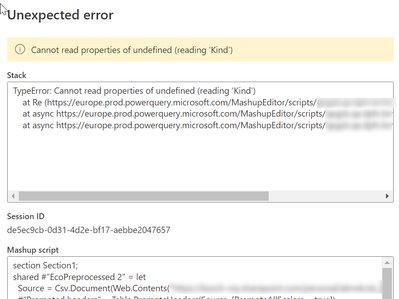
Cannot read properties of undefined (reading 'Kind')
I tried using the AI insights using data flows in PowerBI.
I followed the Tutorial: Use Cognitive Services in Power BI (Preview) - Power BI | Microsoft Learn link
After i load the table and I click on to AI insights icon. I get the following error.


- Mark as New
- Bookmark
- Subscribe
- Mute
- Subscribe to RSS Feed
- Permalink
- Report Inappropriate Content
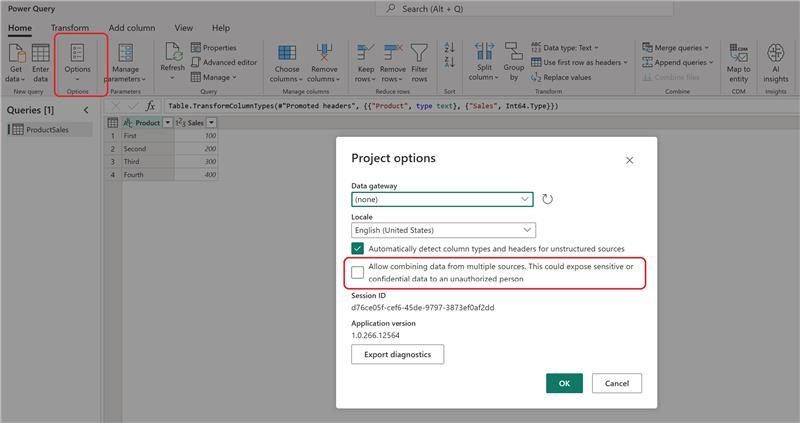
The workaround to this issue is by enabling the Fast Combine feature within Power Query. Before adding any of the AI features, you will need to go into the Options => Project Options => Enable "Allow combining data from mutliple datasources." By default the switch is off, and it needs to be set to on to avoid these types of issues. See the picture below:

- Mark as New
- Bookmark
- Subscribe
- Mute
- Subscribe to RSS Feed
- Permalink
- Report Inappropriate Content
Thanks for posting this solution! I had been pulling my hair out for several hours trying to get AutoML to work. Cheers!!

- Mark as New
- Bookmark
- Subscribe
- Mute
- Subscribe to RSS Feed
- Permalink
- Report Inappropriate Content
Did you solve the issue, I'm facing exacting the same problem
- Mark as New
- Bookmark
- Subscribe
- Mute
- Subscribe to RSS Feed
- Permalink
- Report Inappropriate Content
Same here, can't find a solution. I even tried referencing another dataflow instead of pulling the data directly via gateway
- Mark as New
- Bookmark
- Subscribe
- Mute
- Subscribe to RSS Feed
- Permalink
- Report Inappropriate Content
Hi @Anonymous ,
Did you use gateway?
There are some known issues with using Gateway with Cognitive Services. If you need to use a gateway, we recommend creating a dataflow that imports the necessary data via gateway first. Then create another dataflow that references the first dataflow to apply these functions.
Best Regards,
Community Support Team _ Caitlyn
- Mark as New
- Bookmark
- Subscribe
- Mute
- Subscribe to RSS Feed
- Permalink
- Report Inappropriate Content
thanks for the reply,
No I didn't use a gateway. The steps that i followed was
Create dataflow -> Add table -> Datasource: Text/CSV -> In URL I added the https://pbiaitutorials.blob.core.windows.net/textanalytics/FabrikamComments.csv link.
Even when I add a CSV or Excel file from my local, i get the same error.

- Mark as New
- Bookmark
- Subscribe
- Mute
- Subscribe to RSS Feed
- Permalink
- Report Inappropriate Content
Did you ever get an answer? I'm dealing with the same issue, and it looks like it hasn't been resolved, even though you submitted this months ago.
Helpful resources

Power BI Monthly Update - September 2025
Check out the September 2025 Power BI update to learn about new features.


