Join us at FabCon Atlanta from March 16 - 20, 2026, for the ultimate Fabric, Power BI, AI and SQL community-led event. Save $200 with code FABCOMM.
Register now!Get Fabric Certified for FREE during Fabric Data Days. Don't miss your chance! Request now
Hello guys is it possible to give an access to some users for them to able to view the usage metrics report.
Solved! Go to Solution.
Hi @Kalachuchi
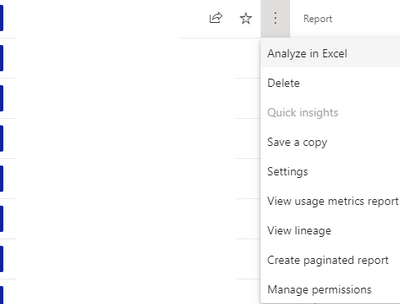
When you view the usage metrics report, go to "File" menu , then "Manage Permissions"..
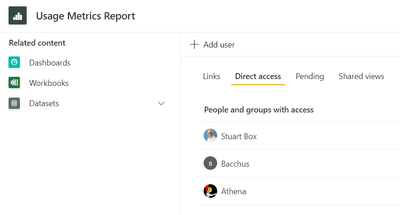
From there, click on "Direct Access" then the plus button "Add user", ann the user you want to share with, the Usage Metrics Report will then turn up in their "Shared With Me" folder in Power BI..
Hope this helps
Stuart
Hi @Kalachuchi
When you view the usage metrics report, go to "File" menu , then "Manage Permissions"..
From there, click on "Direct Access" then the plus button "Add user", ann the user you want to share with, the Usage Metrics Report will then turn up in their "Shared With Me" folder in Power BI..
Hope this helps
Stuart
Check out the November 2025 Power BI update to learn about new features.
Advance your Data & AI career with 50 days of live learning, contests, hands-on challenges, study groups & certifications and more!