Join us at FabCon Atlanta from March 16 - 20, 2026, for the ultimate Fabric, Power BI, AI and SQL community-led event. Save $200 with code FABCOMM.
Register now!The Power BI Data Visualization World Championships is back! Get ahead of the game and start preparing now! Learn more
Hi community,
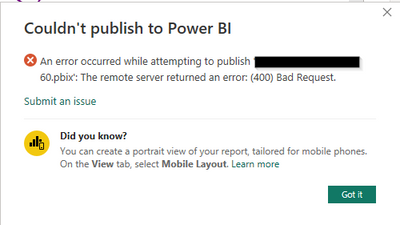
I'm trying to upload a 4.5 GB pbix file to a Premium workspace and I'm getting this error:
Any ideas on how to solve this?
Hi @gp10 ,
It is possible to specify a max dataset size that is less than the max possible size- not sure if this is the case for you, but might be worth looking into:
| Max Offline Dataset Size (GB) | The maximum size of the offline dataset in memory. This is the compressed size on disk. The default value is 0, which is the highest limit defined by SKU. The allowable range is between 0 and the capacity size limit. |
I have P1, so it should be 10GB.
Thanks, I have done everything I could regarding the size.
Hi @gp10 ,
What capacity do you have? EM1/A1 does have a 3 GB limit:
https://learn.microsoft.com/en-us/power-bi/enterprise/service-premium-what-is#capacities-and-skus
You need to reduce the size of your dataset- here are some ideas:
https://www.youtube.com/watch?v=qZOEDBedATA
https://www.alphabold.com/how-to-reduce-dataset-size-in-microsoft-power-bi/
Hi @gp10 ,
You can try to upload the .pbix file directly from the Power BI Workspace like below:
I'd probably also look at trying to reduce the size of the model:
https://www.alphabold.com/how-to-reduce-dataset-size-in-microsoft-power-bi/
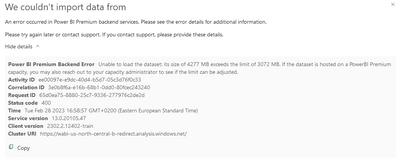
Hi @djurecicK2 thanks for your reply. That didn't solve my problem but I got a different error message:
There is no 3GB limit anywhere.
The Power BI Data Visualization World Championships is back! Get ahead of the game and start preparing now!
| User | Count |
|---|---|
| 56 | |
| 55 | |
| 31 | |
| 18 | |
| 14 |