cancel
Showing results for 
Search instead for 
Did you mean: 

The Power BI Data Visualization World Championships is back! Get ahead of the game and start preparing now! Learn more

Reply
AnilKumar
Helper II
Helper II

Can I Pass the startdate and Enddate as parameters in Power bi service?

Hi,

I want to send the Startdate and Enddate as parameters in power bi service and desktop also. 

Suppose , When I pass the parameters in power bi , it should be integrated with the oracle query I have written and give the details in between that dates only.Is it Possible to do that? I just want like how we do in any WEB Application like that?


Regards,

Susmitha.

1 ACCEPTED SOLUTION

Hi @AnilKumar


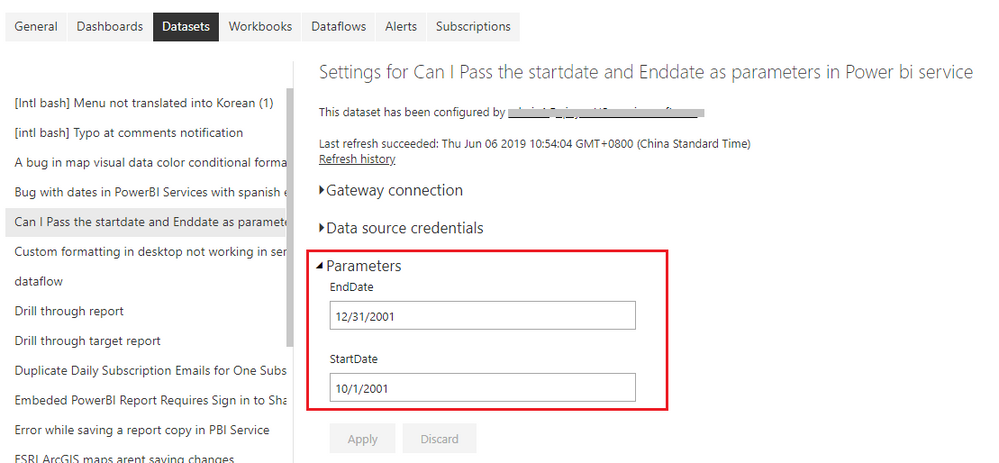
Using the Query Parameter like mentioned in my previous post, the dataset owner needs to change values for these parameters in Dataset Settings -> Parameters tab, click on Apply button to apply change, then refresh the dataset via Refresh Now. 


If you would like the end users to use parameters to filter report data, you can pass parameters in report URL. This method will not affect the report data viewed by other users. See: https://docs.microsoft.com/en-us/power-bi/service-url-filters


Best Regards,
Qiuyun Yu 

Community Support Team _ Qiuyun Yu
If this post helps, then please consider Accept it as the solution to help the other members find it more quickly.

View solution in original post

3 REPLIES 3
v-qiuyu-msft
Community Support
Community Support

Hi @AnilKumar


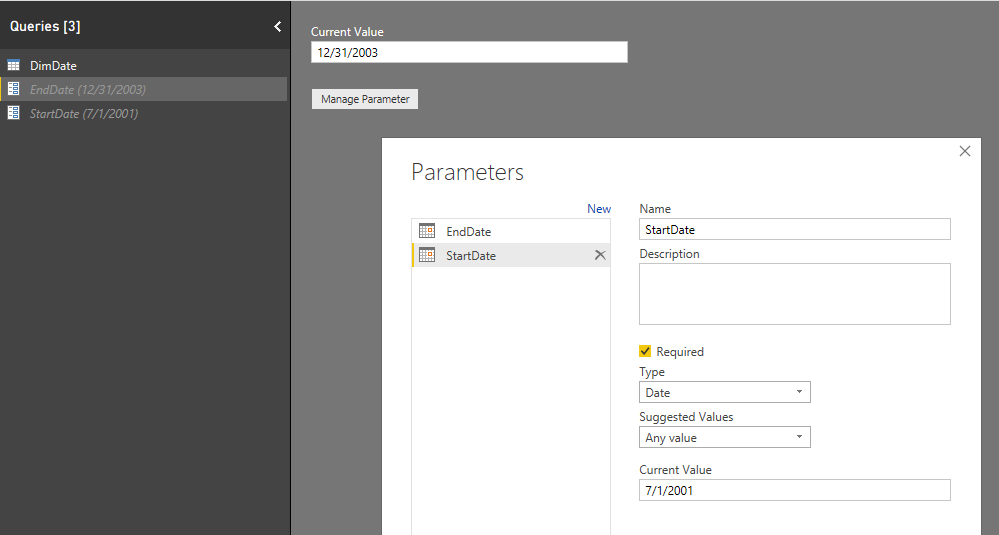
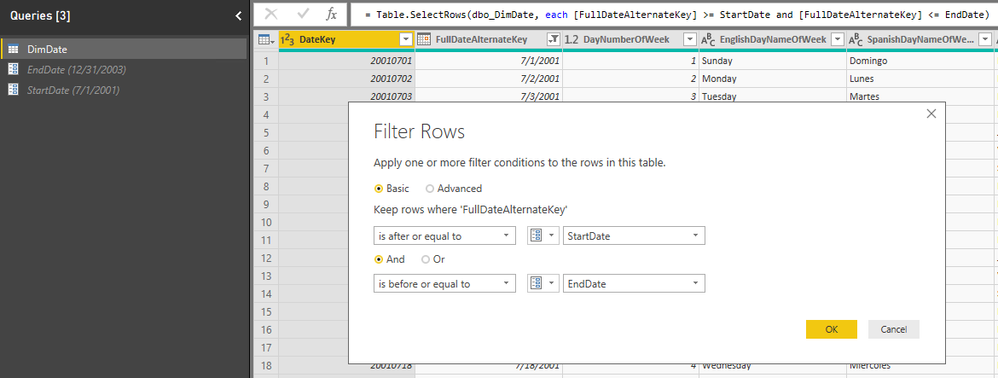
You can utilize the Query Parameter features in Power BI desktop to filter the date column, after publishing the report to Power BI service, change the parameter values then refresh the dataset, corresponding data filtered by parameters will display in the report. 


w1.PNGw2.PNGw3.PNG


Best Regards,
Qiuyun Yu 

Community Support Team _ Qiuyun Yu
If this post helps, then please consider Accept it as the solution to help the other members find it more quickly.

Hi Qiuyun Yu ,


Thank you for your reply . When I give my published link of my report to users how can I pass parameters there?


Regards,

Anil.

Hi @AnilKumar


Using the Query Parameter like mentioned in my previous post, the dataset owner needs to change values for these parameters in Dataset Settings -> Parameters tab, click on Apply button to apply change, then refresh the dataset via Refresh Now. 


If you would like the end users to use parameters to filter report data, you can pass parameters in report URL. This method will not affect the report data viewed by other users. See: https://docs.microsoft.com/en-us/power-bi/service-url-filters


Best Regards,
Qiuyun Yu 

Community Support Team _ Qiuyun Yu
If this post helps, then please consider Accept it as the solution to help the other members find it more quickly.

Helpful resources

Announcements
Power BI DataViz World Championships

Power BI Dataviz World Championships

The Power BI Data Visualization World Championships is back! Get ahead of the game and start preparing now!

December 2025 Power BI Update Carousel

Power BI Monthly Update - December 2025

Check out the December 2025 Power BI Holiday Recap!

FabCon Atlanta 2026 carousel

FabCon Atlanta 2026

Join us at FabCon Atlanta, March 16-20, for the ultimate Fabric, Power BI, AI and SQL community-led event. Save $200 with code FABCOMM.