cancel
Showing results for 
Search instead for 
Did you mean: 

The Power BI Data Visualization World Championships is back! Get ahead of the game and start preparing now! Learn more

Reply
Anonymous
Not applicable

Button Visualization Changes back to Default State

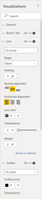
Hello- Whenever I'm wanting to change the action of a button from 'Default State' to 'On Hover' or 'On press', the visualization automatically changes back to 'Default state'. Are there any ideas on what I may be doing wrong or if this is a potential bug?


Thanks.


Screenshot 2021-01-22 142356.pngScreenshot 2021-01-22 142356.png

1 ACCEPTED SOLUTION

hey, I try to replicate your problem and just figure out what happends, its normal its not a bug, when you on the icon menu the 4 status, default, on hover, etc exits at all time, you simple setting how the icon behave on each case:

in default state shape = blank padding 4 

on hover state shape = information icon paddin 4 try this you will see on default the icon its blank it you hover over changes to information and so on. 


see it as a case scenario of the icon, 

if this solved your problema please give some kudos and mark as solution for others to find it. 


Did I answer your question? Mark my post as a solution! / Did it help? Give some Kudos!

Proud to be a Super User!


View solution in original post

3 REPLIES 3
StefanoGrimaldi
Resident Rockstar
Resident Rockstar

check 2 things: 

1) something formats have a apply on the botton of the format to verify the change, 

2) are you using bookmarks? if you after the change you need to update the bookmarks, sometimes bookmarks change to default of the visual if isnt updated with the changes. 


Did I answer your question? Mark my post as a solution! / Did it help? Give some Kudos!

Proud to be a Super User!


Anonymous
Not applicable

It doesn't appear that either of these options are the case. There isn't an 'apply' button and bookmarks aren't being used.

hey, I try to replicate your problem and just figure out what happends, its normal its not a bug, when you on the icon menu the 4 status, default, on hover, etc exits at all time, you simple setting how the icon behave on each case:

in default state shape = blank padding 4 

on hover state shape = information icon paddin 4 try this you will see on default the icon its blank it you hover over changes to information and so on. 


see it as a case scenario of the icon, 

if this solved your problema please give some kudos and mark as solution for others to find it. 


Did I answer your question? Mark my post as a solution! / Did it help? Give some Kudos!

Proud to be a Super User!


Helpful resources

Announcements
Power BI DataViz World Championships

Power BI Dataviz World Championships

The Power BI Data Visualization World Championships is back! Get ahead of the game and start preparing now!

December 2025 Power BI Update Carousel

Power BI Monthly Update - December 2025

Check out the December 2025 Power BI Holiday Recap!

FabCon Atlanta 2026 carousel

FabCon Atlanta 2026

Join us at FabCon Atlanta, March 16-20, for the ultimate Fabric, Power BI, AI and SQL community-led event. Save $200 with code FABCOMM.