Join us at FabCon Atlanta from March 16 - 20, 2026, for the ultimate Fabric, Power BI, AI and SQL community-led event. Save $200 with code FABCOMM.
Register now!The Power BI Data Visualization World Championships is back! It's time to submit your entry. Live now!
Hello.
I'd like to know your suggestions for the last 2 bar labels to be visible in the figure below? (I already know about zoom in slicers and overflow text but id like to know other options)
Thanks in advance.
Solved! Go to Solution.
Hi @filiparibeiro ,
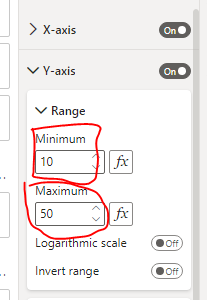
Please try to set the "Y-axis Range" for stacked column chart visual.
Best regards,
Community Support Team_ Binbin Yu
If this post helps, then please consider Accept it as the solution to help the other members find it more quickly.
Hi @filiparibeiro ,
Please try to set the "Y-axis Range" for stacked column chart visual.
Best regards,
Community Support Team_ Binbin Yu
If this post helps, then please consider Accept it as the solution to help the other members find it more quickly.
| User | Count |
|---|---|
| 20 | |
| 14 | |
| 6 | |
| 6 | |
| 5 |
| User | Count |
|---|---|
| 50 | |
| 41 | |
| 40 | |
| 14 | |
| 12 |